Adjust Rates

PC8663-UN-29APR15
Menu Button

PC22295-UN-21MAR16
John Deere Rate Controller 2000 Button

PC22296-UN-21MAR16
Setup Softkey
PC22347-UN-05APR16
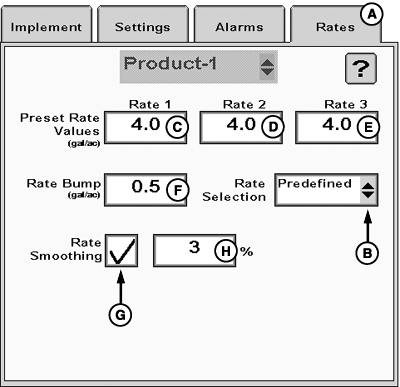
A - Rates Tab
B - Rate Selection Drop-down Menu
C - Rate 1 Preset Value
D - Rate 2 Preset Value
E - Rate 3 Preset Value
F - Rate Bump
G - Rate Smoothing Checkbox
H - Rate Smoothing Percentage
Rates tab (A) allows operator to change rate settings after creating a profile with the setup wizard.
-
Select Menu button.
-
Select John Deere Rate Controller 2000 button.
-
Select Setup softkey.
-
Select Rates tab (A).
-
Select Rate Selection from drop-down menu (B) to choose rate type displayed on main run page.
- Predefined — Displays selection buttons for Preset Rate Values. Enter up to three Preset Rate Values (C—E). Rate 1 Preset value is required.
- Rate Bump — Displays plus (+) and minus (-) buttons that increment target rate by Rate Bump value. Enter Rate Bump (F).
-
Map Based — Displays prescription target rate for current
GPS location.
(Reference Apex™ or MyJohnDeere.com for more information about creating prescriptions.)
-
If desired, select Rate Smoothing checkbox (G) and enter Rate Smoothing Percentage (H).
|
Apex is a trademark of Deere & Company |
RW00482,0000641-19-20160415 |