Setup Wizard — NH3 Tool

PC8663-UN-29APR15
Menu Button

PC22295-UN-21MAR16
John Deere Rate Controller 2000 Button

PC22296-UN-21MAR16
Setup Softkey
-
Select Menu button.
-
Select John Deere Rate Controller 2000 button.
-
Select Setup softkey.
-
PC22816-UN-30JUN16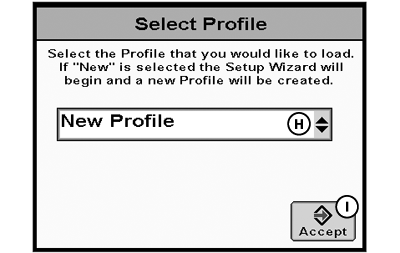
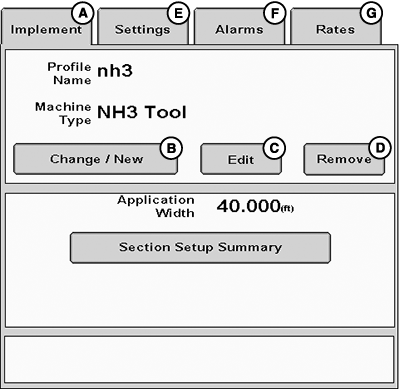
PC22298-UN-13APR16A - Implement Tab
B - Change / New Button
C - Edit Button
D - Remove Button
E - Setting Tab
F - Alarms Tab
G - Rates Tab
H - Select Profile Drop-down Menu
I - Accept Button
Select Implement tab (A). -
Select Change / New button (B).
NOTE: If a profile is already configured, selecting Edit button (C) starts setup wizard for that profile and all steps must be completed to close the wizard.
A maximum of eight profiles can be saved. Selecting Remove button (D) deletes selected profile.
To edit individual settings without going through the wizard, select Settings (E), Alarms (F), or Rates (G) tabs.
-
Select New Profile from drop-down menu (H).
-
Select Accept button (I).
-
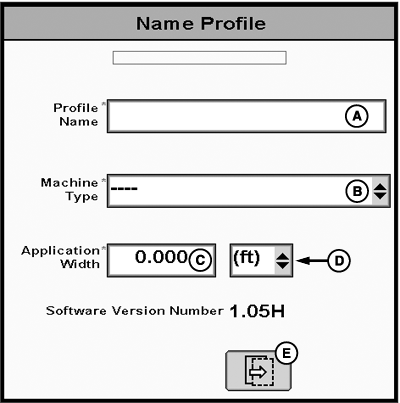
PC22300-UN-21MAR16A - Profile Name
B - Machine Type Drop-down Menu
C - Application Width
D - Units of Measurement Drop-down Menu
E - Next Page Button
Enter Profile Name (A). -
Select Machine Type from drop-down menu (B).
-
Enter Application Width (C).
-
Select units of measurement from drop-down menu (D).
-
Select Next Page button (E).
-
NOTE: NH3 applications can be configured with up to three products. For ease of instruction, this setup wizard uses a single product. If multiple products are selected, follow the setup wizard prompts and set up section groups.
(Reference Setup Section Groups for more information.)
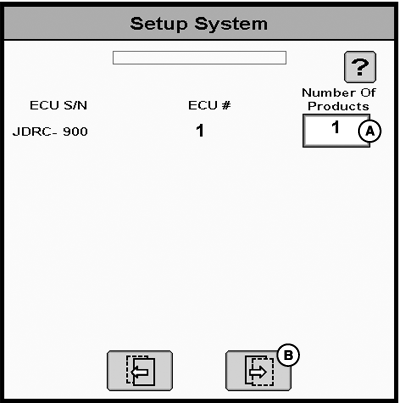
PC22351-UN-28MAR16A - Number of Products
B - Next Page Button
Enter the Number of Products (A). -
Select Next Page button (B).
-
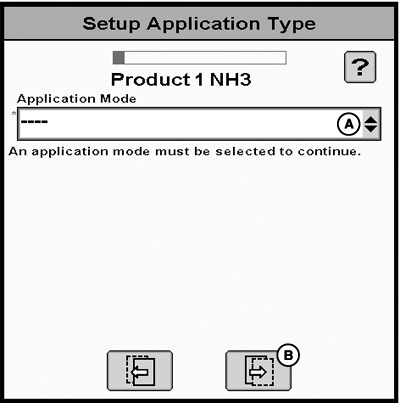
PC22352-UN-28MAR16A - Application Mode Drop-down Menu
B - Next Page Button
Select Application Mode from drop-down menu (A).- NH3 — Conventional anhydrous ammonia applications.
- NH3 AccuFlow HP+ — Specific for Raven AccuFlow HP™ Plus with a boost pump that increases the cooler capacity. John Deere Rate Controller 2000 has the ability to control the PWM valve on the boost pump.
-
Select Next Page button (B).
-
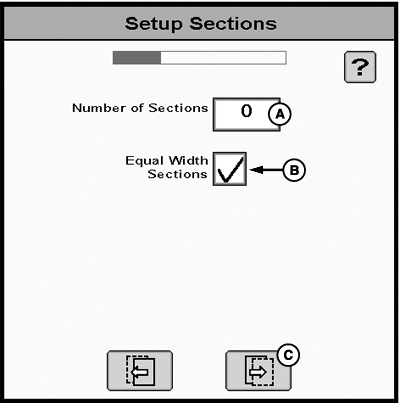
PC22353-UN-28MAR16A - Number of Sections
B - Equal Width Sections Checkbox
C - Next Page Button
Enter Number of Sections (A). -
If applicable, select Equal Width Sections checkbox (B).
-
Select Next Page button (C).
-
NOTE:
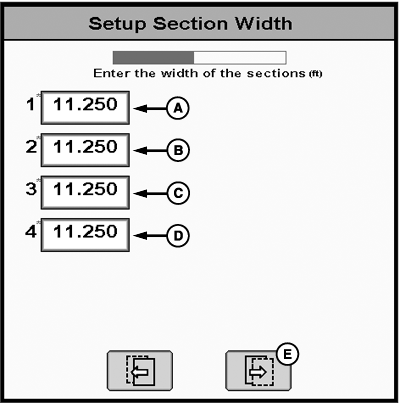
PC22305-UN-21MAR16A - Section 1 Width
B - Section 2 Width
C - Section 3 Width
D - Section 4 Width
E - Next Page Button
Total width of all sections must be equal to total application width. If Equal Width Sections was selected, application width is evenly divided by number of sections.Enter width for each section (A—D).
-
Select Next Page button (E).
-
NOTE:
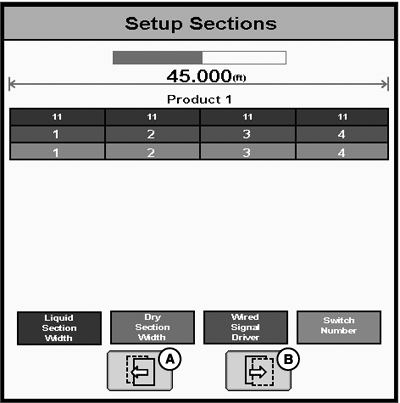
PC22306-UN-21MAR16A - Previous Page Button
B - Next Page Button
Graphic displays each section width and output driver that controls each section valve. Verify that implement wiring is correct. Application width and section widths may only be edited in the setup wizard. If needed, select Previous Page button (A) to make corrections.Review Setup Sections and select Next Page button (B).
-
NOTE:
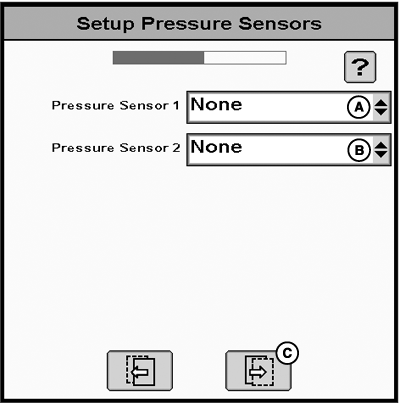
PC22307-UN-21MAR16A - Pressure Sensor 1 Drop-down Menu
B - Pressure Sensor 2 Drop-down Menu
C - Next Page Button
Raven AccuFlow HP™ Plus is automatically configured with two pressure sensors.Custom sensors do not function properly until a calibration is completed.
If equipped, select pressure sensor configuration from drop-down menus (A and B).
-
Select Next Page button (C).
-
NOTE:
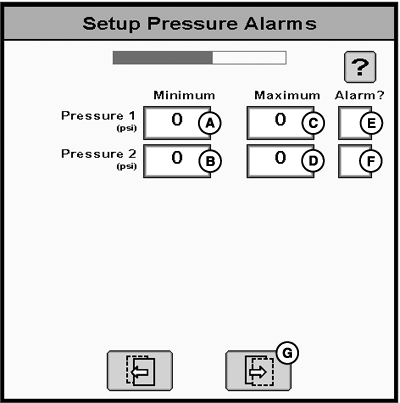
PC22308-UN-21MAR16A - Pressure Sensor 1 Minimum
B - Pressure Sensor 2 Minimum
C - Pressure Sensor 1 Maximum
D - Pressure Sensor 2 Maximum
E - Pressure Sensor 1 Alarm Checkbox
F - Pressure Sensor 2 Alarm Checkbox
G - Next Page Button
Pressure alarm settings are based on operator preference. Set up alarms so they notify operator before system needs attention.If sensors were specified, set up pressure alarms:
-
Enter Minimum Pressure (A and B).
-
Enter Maximum Pressure (C and D).
-
To enable sensor minimum and maximum alarm, select Alarm checkbox (E and F).
-
Select Next Page button (G).
-
-
 CAUTION: Selecting the wrong valve type may result in valves
opening unexpectedly. To avoid injury from exposure to chemicals,
verify the correct valve is selected. Review control valve type before
moving John Deere Rate Controller 2000 between implements.
CAUTION: Selecting the wrong valve type may result in valves
opening unexpectedly. To avoid injury from exposure to chemicals,
verify the correct valve is selected. Review control valve type before
moving John Deere Rate Controller 2000 between implements.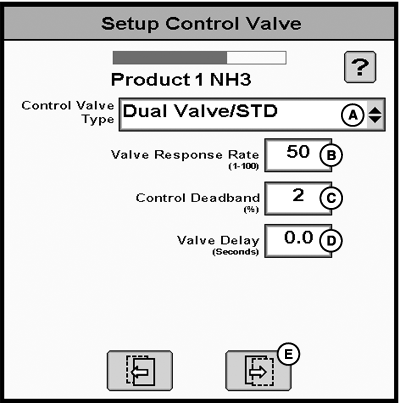
PC22354-UN-28MAR16A - Control Valve Type Drop-down Menu
B - Valve Response Rate
C - Control Deadband
D - Valve Delay
E - Next Page Button
NOTE: Controller utilizes control valve to manipulate application rates.
AccuFlow HP™ Plus is automatically configured with a single fast close valve.
Select Control Valve Type from drop-down menu (A).
NOTE: Entry fields vary for each control type selected. Use default values for initial setup.
(For more information, reference Adjust Control Valve.)
-
Enter Valve Response Rate (B).
-
Enter Control Deadband (C)
-
Enter Valve Delay (D).
-
Select Next Page button (E).
-
NOTE:
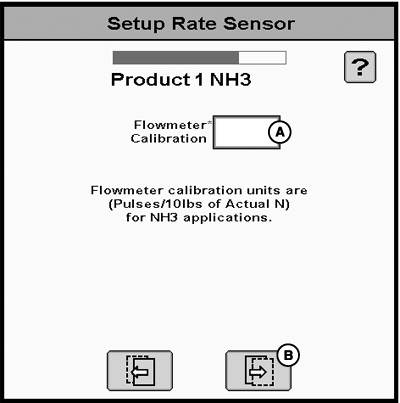
PC22355-UN-28MAR16A - Flowmeter Calibration
B - Next Page Button
Most flowmeters are marked with a calibration number and pulse/units to use for the initial setup. Verify units of measure marked on flowmeter. If needed, convert to pulses per 10 pounds of actual nitrogen. NH3 contains 4.22 lbs of actual nitrogen per gallon.pulses / 10 lbs = ((?) pulses / 10 gallons) / 4.22
Additional flowmeter calibration is recommended.
(For more information, reference Calibrate Flowmeter.)
Enter Flowmeter Calibration (A).
-
Select Next Page button (B).
-
NOTE:
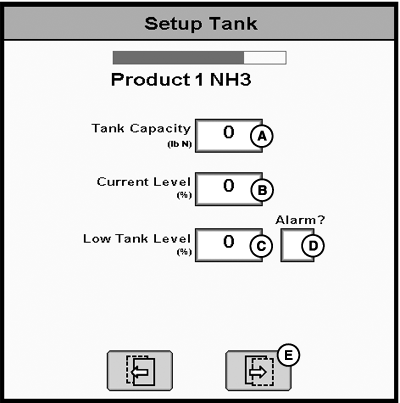
PC22357-UN-28MAR16A - Tank Level
B - Current Level
C - Low Tank Level
D - Low Tank Level Alarm Checkbox
E - Next Page Button
John Deere Rate Controller 2000 estimates tank level based on the calculated applied volume.Enter Tank Capacity (A).
-
Enter Current Level (B).
-
If desired, enter Low Tank Level (C) and select Low Tank Level Alarm checkbox (D).
-
Select Next Page button (E).
-
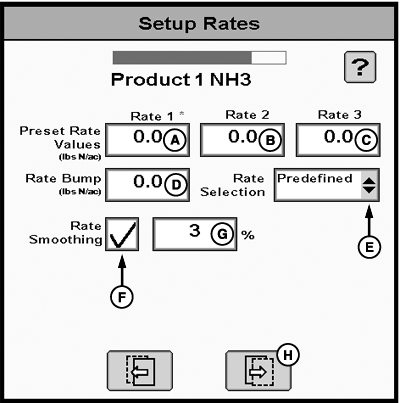
PC22358-UN-28MAR16A - Rate 1 Preset Value
B - Rate 2 Preset Value
C - Rate 3 Preset Value
D - Bump Rate
E - Rate Selection Drop-down Menu
F - Rate Smoothing Checkbox
G - Rate Smoothing Percentage
H - Next Page Button
Enter up to three Preset Rate Values (A—C). Rate 1 preset value is required. -
Enter Rate Bump (D).
-
Select Rate Selection from drop-down menu (E) to choose rate type displayed on main run page.
- Predefined — Displays selection buttons for Preset Rate Values.
- Rate Bump — Displays plus (+) and minus (-) buttons that increment target rate by Rate Bump value.
-
Map Based — Displays prescription target rate for current
GPS location.
(Reference Apex™ or MyJohnDeere.com for more information about creating prescriptions.)
-
NOTE: Rate smoothing removes small fluctuations in the as-applied rate values. The displayed as-applied rate remains constant until rate increases or decreases by more than the set rate smoothing percentage.
Default is 3% and can be set between 3—15%.
If desired, select Rate Smoothing checkbox (F) and enter Rate Smoothing Percentage (G).
-
Select Next Page button (H).
-
NOTE:
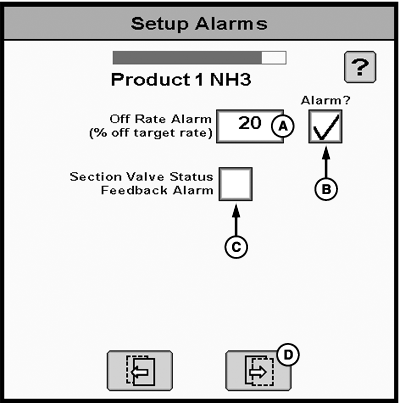
PC22359-UN-28MAR16A - Off Rate Alarm
B - Off Rate Alarm Checkbox
C - Section Valve Status Feedback Alarm Checkbox
D - Next Page Button
If enabled, Off Rate Alarm displays if the system detects a rate change greater than the entered percentage for more than 5 seconds.If desired, enter Off Rate Alarm (A) and select Alarm checkbox (B).
-
If desired, select Section Valve Status Feedback Alarm checkbox (C).
-
Select Next Page button (D).
-
Review Setup Summary and select Accept button (A).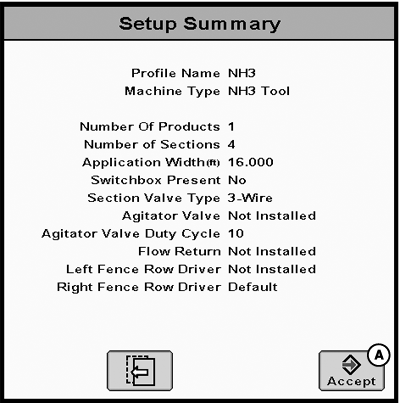
PC22360-UN-28MAR16
|
AccuFlow HP is a trademark of Raven Industries Inc. Apex is a trademark of Deere & Company |
RW00482,0000699-19-20160630 |