Adjust Rate Control
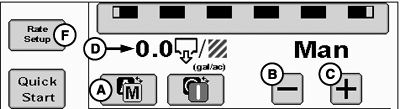
PC22417-UN-05APR16
Manual Rate Control
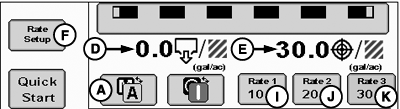
PC22686-UN-23MAY16
Predefined Rate Control
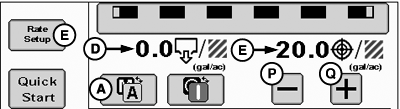
PC22685-UN-23MAY16
Rate Bump Rate Control
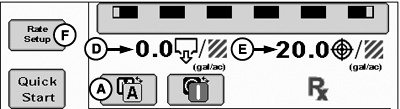
PC22420-UN-05APR16
Map Based Rate Control
PC22684-UN-23MAY16
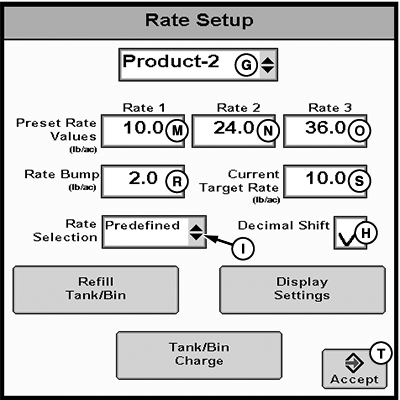
Rate Setup
A - Manual / Automatic Toggle
B - Minus (-) Button
C - Plus (+) Button
D - Actual Rate
E - Target Rate
F - Rate Setup Button
G - Product Drop-down Menu
H - Decimal Shift Checkbox
I - Rate Selection Drop-down Menu
J - Rate 1 Preset Button
K - Rate 2 Preset Button
L - Rate 3 Preset Button
M - Rate 1 Preset
N - Rate 2 Preset
O - Rate 3 Preset
P - Plus (+) Button
Q - Minus (-) Button
R - Rate Bump
S - Current Target Rate
T - Accept Button
Select Toggle button (A) to toggle between manual or automatic rate control. If operating multiple products, select desired product to toggle between manual or automatic rate control for that product.
Manual Rate Control
Select minus (-) or plus (+) buttons (B and C) to open or close the control valve. Monitor Actual Rate (D) while making adjustments.
Automatic Rate Control
Rate controller operates control valve to a defined Target Rate (E).
To change rate type displayed on run page:
-
Select Rate Setup button (F).
-
If operating multiple products, select desired product from drop-down menu (G).
-
To enter values with a decimal, select Decimal Shift checkbox (H).
-
Select Rate Selection from drop-down menu (I).
- Predefined — Displays selection buttons for Preset Rate Values (J—L). Enter up to three Preset Rate Values (M—O). Rate 1 Preset value is required.
- Rate Bump — Displays plus (+) and minus (-) buttons (P and Q) that increment target rate by Rate Bump value. Enter Rate Bump (R) and Current Target Rate (S).
-
Map Based — Displays prescription target rate for current
GPS location.
(Reference Apex™ or MyJohnDeere.com for more information about creating prescriptions.)
-
Select Accept button (T).
|
Apex is a trademark of Deere & Company |
RW00482,00006A6-19-20160601 |