Quick Start
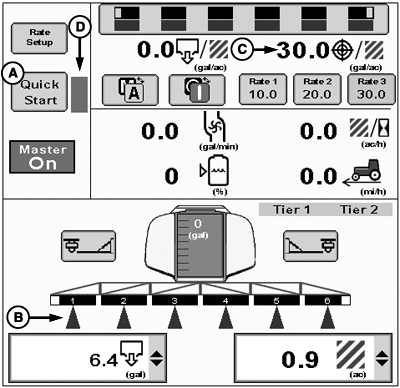
PC22430-UN-05APR16
A - Quick Start Button
B - Section Status Indicators
C - Target Rate
D - Countdown Indicator
NOTE: Quick Start is not available for any NH3 configuration.
Quick Start button (A) enables after activating system for a product. If operating multiple products, select desired products and enable system, and then select Quick Start button for each product. Selecting Quick Start button turns on all sections (B) only for selected product and applies product at target rate (C).
When selected, Quick Start overrides Section Control and machine speed threshold for 15 seconds for selected product. A countdown indicator (D) appears when selected. Select Quick Start button at any time during countdown to reset counter back to 15 seconds.
Use Quick Start to prime system when:
- Entering a field.
- Starting in a field corner.
- Performing calibration or diagnostic tests.
|
RW00482,00006A9-19-20160609 |