Setup Implement Height Indicator

PC8663-UN-29APR15
Menu Button

PC22295-UN-21MAR16
John Deere Rate Controller 2000 Button

PC22296-UN-21MAR16
Setup Softkey
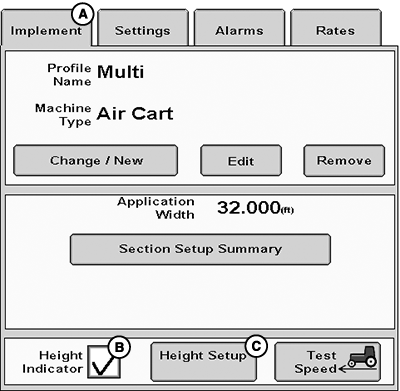
PC22693-UN-25MAY16
A - Implement Tab
B - Height Indicator Checkbox
C - Height Setup Button
NOTE: Implement height switch is required for NH3 applications and cannot be disabled.
Implement height indicator is optional for liquid fertilizer tools (switch only) and air carts (switch or sensor). Implement height indicator can be enabled, disabled, and set up without the setup wizard for these applications.
-
Select Menu button.
-
Select John Deere Rate Controller 2000 button.
-
Select Setup softkey.
-
Select Implement tab (A).
-
To enable, select Implement Height Switch or Height Indicator checkbox (B).
-
To change the type of height indicator, select Height Setup button (C).
-
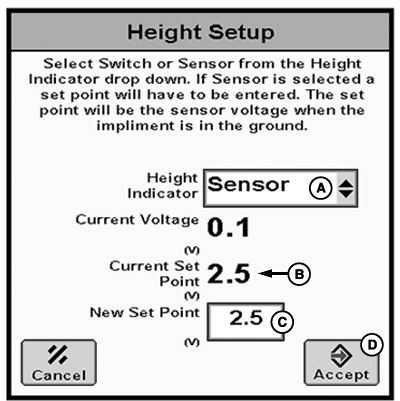
PC22694-UN-09JUN16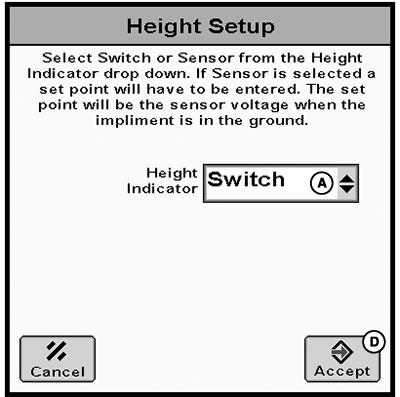
PC22695-UN-09JUN16A - Height Indicator Drop-down Menu
B - Current Voltage
C - New Set Point
D - Accept Button
Select Sensor or Switch from Height Indicator drop-down menu (A).If Sensor is selected, lower implement to the ground and enter Current Voltage (B) into New Set Point (C).
-
Select Accept button (D).
|
RW00482,00006AD-19-20160609 |