Tank / Bin Charging

PC22709-UN-01JUN16
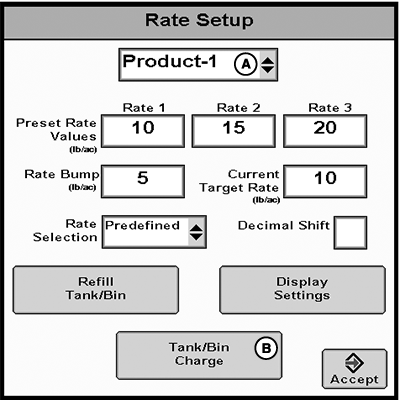
Rate Setup Button
PC22710-UN-01JUN16
A - Product Drop-down Menu
B - Tank / Bin Charge Button
 CAUTION: Always check for bystanders before starting spinner.
Failure to do so may cause injury to you or others.
CAUTION: Always check for bystanders before starting spinner.
Failure to do so may cause injury to you or others.
NOTE: If tank or bin is not enabled, Tank / Bin Charge button is grayed out.
-
Select Rate Setup button.
-
Select a product from drop-down menu (A). Control valve assigned to the product must control rate.
-
Select Tank / Bin Charge button (B).
-
NOTE:
PC22711-UN-01JUN16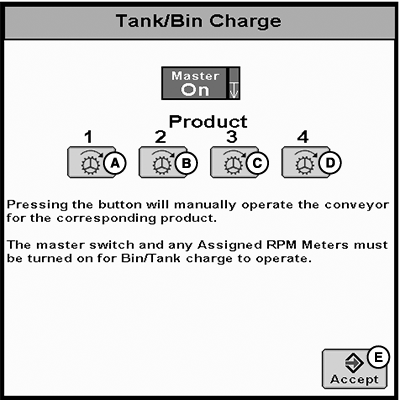
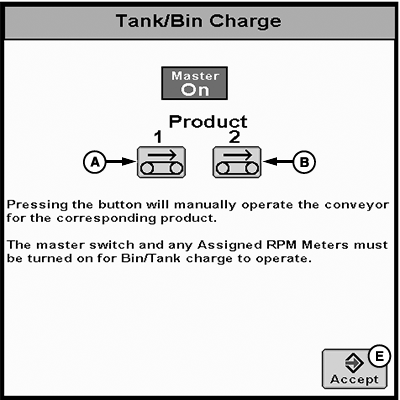
PC22712-UN-01JUN16A - Product 1 Tank / Bin Charge Button
B - Product 2 Tank / Bin Charge Button
C - Product 3 Tank / Bin Charge Button
D - Product 4 Tank / Bin Charge Button
E - Accept Button
Master switch and any assigned RPM meters must be turned on for Tank / Bin charge to operate.To manually operate conveyor, select and hold Product Tank / Bin Charge button (A—D).
-
Select Accept button (E) when finished.
|
RW00482,00006B5-19-20160609 |