Calibrate Flowmeter — Applied Liquid Product

PC8663-UN-29APR15
Menu Button

PC22295-UN-21MAR16
John Deere Rate Controller 2000 Button

PC22296-UN-21MAR16
Setup Softkey
PC22369-UN-31MAR16

PC22377-UN-31MAR16
Applied Product Calibration Button
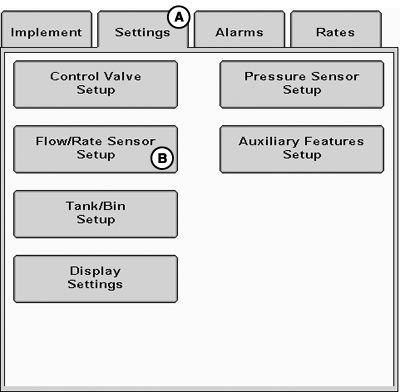
A - Settings Tab
B - Flow / Rate Sensor Setup Button
Applied product test allows operator to apply a known amount of product to calibrate the flowmeter. The actual amount applied is compared to the amount recorded by the rate controller and that is used to adjust the calibration value.-
Select Menu button.
-
Select John Deere Rate Controller 2000 button.
-
Select Setup softkey.
-
Select Settings tab (A).
-
Select Flow / Rate Sensor Setup button (B).
-
Select Applied Product Calibration button.
-
PC22374-UN-31MAR16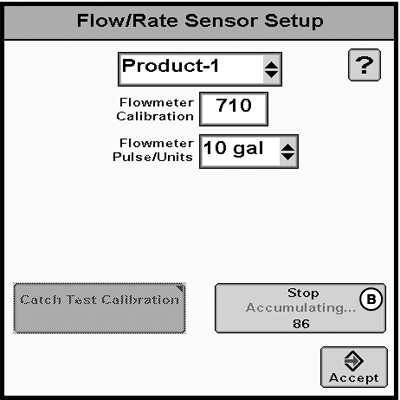
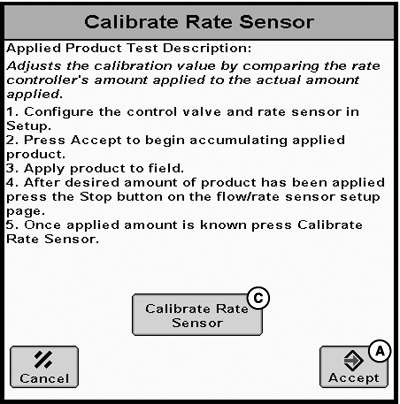
PC22725-UN-02JUN16A - Accept Button
B - Stop Button
C - Calibrate Rate Sensor Button
Configure control valve and rate sensor. -
Select Accept (A).
-
NOTE: Turn master switch on to apply product. While applying product, operator can navigate away from page and return after applying sufficient amount of product to complete calibration.
Apply product to field.
-
After desired amount of product has been applied, select Stop button (B).
-
Select Calibrate Rate Sensor (C).
-
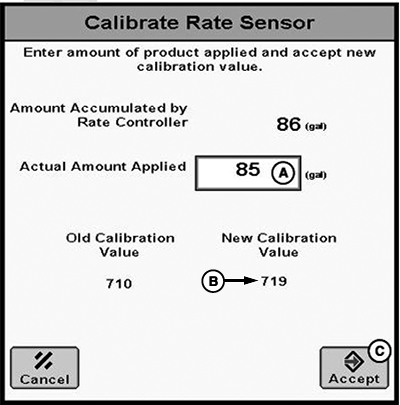
PC22726-UN-02JUN16A - Actual Amount Applied
B - New Calibration Value
C - Accept Button
Enter amount of product applied (A). New Calibration Value (B) is calculated after amount is entered. -
Select Accept button (C).
|
RW00482,00006BC-19-20160602 |