Set Up Hydraulic Control—Selective Control Valve (SCV)

PC8663-UN-29APR15
Menu Button

PC14926-UN-27APR12
Application Controller 1100 Button

PC12961-UN-13APR15
Setup Softkey

PC17989-UN-07NOV13
SCV Threshold Setup Button
 CAUTION: To avoid serious injury, keep area around equipment
clear. Procedure requires machine to move forward.
CAUTION: To avoid serious injury, keep area around equipment
clear. Procedure requires machine to move forward.
Implement moves during calibration. Read and follow Operate Implement Automation Systems Safely in Safety section before performing calibration.
NOTE: Do not calibrate SCV threshold when an external valve is used. To adjust hydraulic flow to external valve, skip to Set Up Hydraulic Control—External Valve.
Threshold values are unique for every SCV due to normal manufacturing tolerances. Fine-tune threshold value to lowest value that generates a sensor voltage change for optimal performance.
SCV Value Test is used to calibrate Application Controller 1100 to determine minimum amount of hydraulic controller signal required before steering mechanism moves. Without SCV threshold calibration, steering mechanism steers faster in one direction, under steers, over steers, or does not perform as expected due to hydraulic limitations. These problems make it difficult for controller to maintain an off-track error of 0.
NOTE: On machine designs that utilize linkage between hydraulic steering, cylinder, steering mechanism, and wheel angle sensor, it is important that wheel angle sensor moves simultaneously with hydraulic cylinder that is causing movement in steering mechanism.
Set up SCV Threshold if:
- Both extend and retract values are set at 5 or 250 (factory default values).
- Values are copied from another machine.
- Hydraulic hose routing changes between SCV 1 and SCV 3.
- Hydraulic component repair is made on machine or implement.
- Counter-balance valve is adjusted.
- Hydraulic flow rate is adjusted.
Set Up SCV Thresholds
NOTE: Ensure that hydraulic oil is at operating temperature before performing calibration.
-
Select Menu button.
-
Select Application Controller 1100 button.
-
Select Setup softkey.
-
Select SCV Threshold Setup button.
-
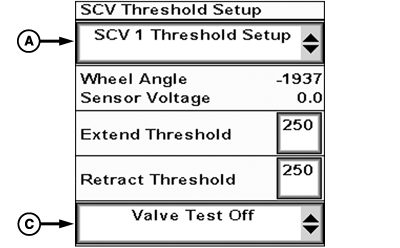
PC21355-UN-14JUL15SCV Threshold Setup
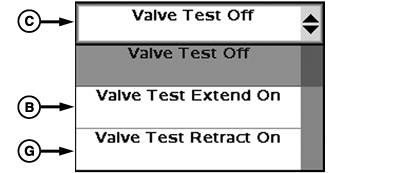
PC21356-UN-14JUL15Valve Test Drop-down
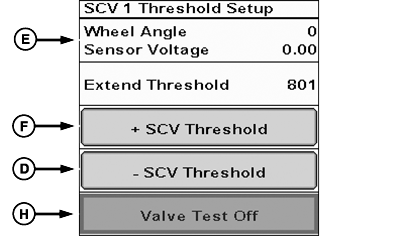
PC21357-UN-15JUL15SCV Valve Test
A - SCV Threshold Setup Drop-down
B - Valve Test Extend On
C - Valve Test Drop-down
D - Decrease (-) SCV Threshold
E - Sensor Voltage
F - Increase (+) SCV Threshold
G - Valve Test Retract On
H - Valve Test Off
Select SCV being used from SCV Threshold Setup drop-down (A). -
NOTE: Place selected SCV in AC or AUTO.
Place SCV in extend detent position, not float.
-
Drive machine forward, faster than 0.7 km/h (0.45 mph).
Do not engage AutoTrac™.
-
NOTE: Some implements require sensor to be fully retracted to increase range of extend motion.
See machine Operator’s Manual for speed requirements on SCV.
Select Valve Test Extend On (B) from drop-down (C).
-
Select Decrease (-) SCV Threshold button (D) until it generates no change in sensor voltage (E).
-
Select Increase (+) SCV Threshold button (F) until sensor voltage value changes as slowly as possible while maintaining continuous movement.
NOTE: If implement steering cylinder reaches maximum or minimum stroke during test, select Valve Test Retract On (G) to reposition cylinder.
-
Select Valve Test Off button (H) to complete extend threshold calibration..
-
Select Valve Test Retract On from drop-down.
-
Select Decrease (-) SCV Threshold button until it generates no change in sensor voltage.
-
Select Increase (+) SCV Threshold button until sensor voltage value changes as slowly as possible while maintaining continuous movement.
NOTE: If implement steering cylinder reaches maximum or minimum stroke during test, select Valve Test Extend On to reposition cylinder.
-
Select Valve Test Off button to complete retract threshold calibration.
If desired performance is not achievable, adjust hydraulic flow on right-hand console or on CommandCenter™ to supply adequate hydraulic flow to implement steering system. If threshold values are at maximum setting, increase hydraulic flow setting. If threshold values are at minimum setting, decrease hydraulic flow setting. Adjusting threshold down is only necessary on small cylinders or low flow mechanisms.
NOTE: Repeat SCV threshold setup after hydraulic flow is adjusted.
After calibration is complete, verify proper performance before using Active Implement Guidance in field operation.
|
AutoTrac is a trademark of Deere & Company CommandCenter is a trademark of Deere & Company |
AL70325,0000379-19-20160314 |