Engage Active Implement Guidance
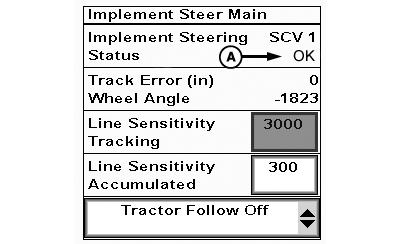
PC22111-UN-04FEB16
A - Status
-
IMPORTANT: If steering device is not in contact with ground, Active Implement Guidance cannot effectively steer implement.
NOTE: For ease of instruction, this manual uses selective control valve (SCV) 3 for the Active Implement Guidance system. Operator can choose to use SCV 1 if preferred.
Set up guidance line on GreenStar™ Display.
-
Verify controller Status (A) displays OK.
(Reference Troubleshooting if status is not OK.)
-
NOTE: SCV cannot change to AUTO or AC mode when machine is in park.
Take machine out of park.
-
NOTE: Leave SCV 3 in detent after each pass.
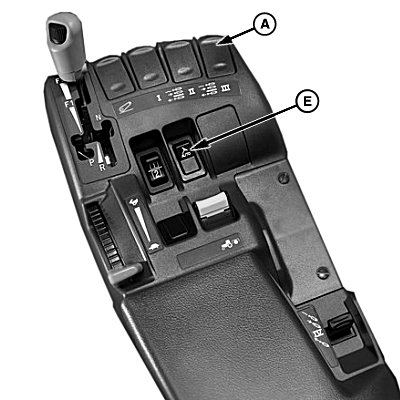
PC18002-UN-11DEC13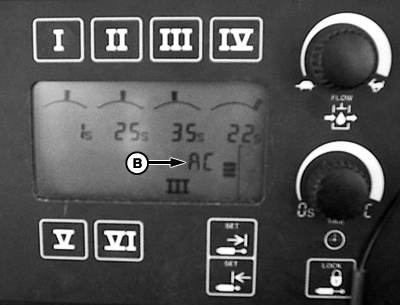
PC18234-UN-11DEC13
PC22235-UN-01MAR16A - SCV 3 Control Lever
B - AC Mode
C - AUTO Mode Indicator (Turned Off)
D - AUTO Mode Indicator (Turned On)
E - AutoTrac™ Resume Switch
To engage implement auto mode, place SCV control lever (A) in forward detent position.
- If operating a machine with TouchSet™ Display, verify EC changes to AC (B).
- If operating a machine with CommandCenter™, verify AUTO off (C) changes to AUTO on (D).
-
IMPORTANT: If AutoTrac™ Only is the requirement to engage, Active Implement Guidance begins acquiring line immediately after AutoTrac™ resume switch (E) is selected. For implements using a coulter steering system, movement starts even if implement is not in contact with ground.
Select resume switch to activate AutoTrac™ and Active Implement Guidance simultaneously. Machine and implement steer toward guidance line.
NOTE: Active Implement Guidance operates in reverse for 45 seconds. After 45 sec., AutoTrac™ and Active Implement Guidance disengage.
|
GreenStar is a trademark of Deere & Company TouchSet is a trademark of Deere & Company CommandCenter is a trademark of Deere & Company AutoTrac is a trademark of Deere & Company |
AL70325,000037E-19-20160314 |