Machine Configuration
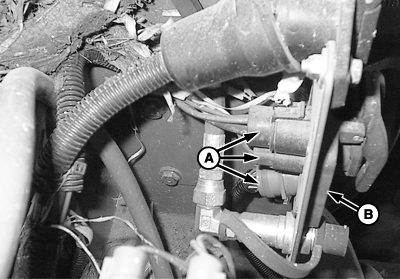
PC19673-UN-28MAY14
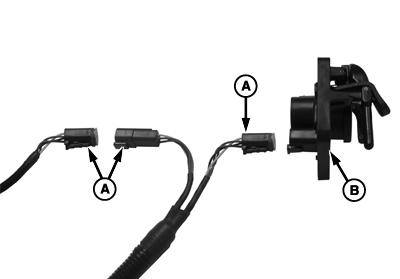
PC19672-UN-27MAY14
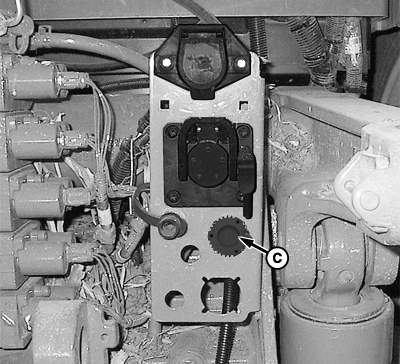
PC19674-UN-28MAY14
A - Machine-side Connectors
B - ISO Connector
C - Feedback Sensor Connector
| Symptom | Problem | Solution |
|
Implement not displayed or inoperable. | Dirty or loose connectors (A) on machine-side of ISO connector (B). |
Clean connectors and reconnect tightly. |
|
GreenStar™ harness improperly connected. |
Power down machine and system, disconnect harness, clean, and install properly. |
|
|
Electrical short in harness. |
Check electrical wiring for breaks, shorts, and damage. |
|
|
Application controller connected with machine powered on and (or) codes active on machine. |
Turn off machine and completely disconnect application controller from system. (Reference Disconnecting the Active Implement Guidance System.) Start machine and allow display to completely boot up. Turn machine off and reconnect application controller and all harnesses. |
|
|
Application controller not communicating with CAN bus after key cycle. |
Verify application controller has switched power. If application controller has constant power, it does not power down and will not appear on display when machine is powered back on. |
|
SCV does not enter Auto mode. | SCV option connector not plugged in. |
Verify that 9-pin SCV option connector is plugged into machine. |
|
AC (Auto Control) not showing on selective control valve (SCV) display (30 series tractor or older). Auto Mode checkbox is grayed out and cannot be selected (R series tractors). | Dirty or loose machine-side implement feedback sensor connector (C) at rear of machine. Early versions of harness used a 10-pin rectangular connector. |
Clean connectors and reconnect tightly. |
|
SCV is not in detent. |
Ensure that SCV is in detent and not float mode. If SCV lever remains in forward position, then it is in float mode. |
|
|
Incorrect Setup. |
Verify that correct control type is selected, SCVs are selected in Active Implement Guidance setup, and power has been cycled. |
|
|
SCV selection not correct in CommandCenter™ (R series). |
On CommandCenter™, select SCV being utilized. |
|
System steers in one direction. | Inline check valves are installed in the system. |
Remove check valves. |
|
Hydraulic hoses are reversed. |
Switch positions of hydraulic hoses and calibrate maximum left, center, and maximum right positions. |
|
|
Application controller was connected while machine was running, creating hydraulic controller fault codes. |
(Reference Reset Application Controller 1100 for more information.) |
|
Side shift 3-point hitch locks in one direction after reaching headland. | Implement Shifter mode - Shifter Stay On Enabled. |
Drive toward next guidance line and select AutoTrac™ resume. Implement acquires line and begins tracking.
Change Implement Shifter mode to Shifter Stay On Disabled. |
|
Compatibility of hitch with Active Implement Guidance. Hitch travel is not parallel to machine rear axle. |
Install an implement feedback sensor and sensor harness. Change control selection from Implement Shifting to Implement Steering. Calibrate left, center, and right positions. |
|
Implement steers away from line when AutoTrac™ resume button is pressed. | SCV hoses hooked up in reverse. |
Switch hoses in SCV outlets. |
|
Implement steering calibration was done with right and left limits reversed. |
Reversing right and left inputs and perform implement steer calibration again. |
|
|
Incorrect implement feedback sensor connector plugged in to wheel angle sensor. |
Plug in correct implement feedback connector for SCV selected in controller. |
|
Machine not steering to line. | EC displayed on SCV display. |
Push correct SCV control lever into detent to bring up AC mode. |
|
Hydraulic steering not responding well. | Steering cylinder leaking fluid. |
Check for leakage. (Reference service section for more information.)
Repair or replace cylinder. Contact your John Deere dealer or qualified service provider for assistance. |
|
Insufficient machine hydraulic pressure. |
Check machine hydraulic pressure. (Reference machine Operator's Manual for more information.)
Ensure that hydraulic oil is at operating temperature.
Use correct size hydraulic cylinders for machine pressure. |
|
|
Counterbalance valve improperly adjusted. |
Adjust counterbalance valve cartridges and perform threshold calibration. |
|
|
Hydraulic hoses connected improperly or poorly. |
Check hose O-rings, connect properly, and tighten connections. |
|
|
Valve is frozen. |
Manually cycle hydraulic cylinders to the full right and left. If condition repeats, oil may be contaminated, causing plugging, or SCV may require a shuttle valve to prevent it from going into Desilting Mode during low flow conditions. |
|
|
Active Implement Guidance settings incorrect. |
Verify system moves fluidly with extend and retract tests, and adjust sensitivities and thresholds accordingly. |
|
Active Implement Guidance does not engage. | Implement steering Status does not display OK. |
Refer to System Status table in Troubleshooting. |
|
Application controller was connected while machine was running, creating hydraulic controller fault codes. |
1. Turn off machine. 2. Disconnect application controller, constant power harness, and option connector from external rear panel of cab. 3. Disconnect CAN bus T-connectors and connect 4-pin connector directly to ISO implement connector. 4. Start machine. Once all systems start up, turn off machine. 5. Reconnect application controller, constant power harness, and option connector. 6. Reconnect CAN bus T-connectors between 4-pin connector and ISO implement connector. |
|
GreenStar is a trademark of Deere & Company CommandCenter is a trademark of Deere & Company AutoTrac is a trademark of Deere & Company |
AL70325,0000380-19-20160323 |