Disconnecting the Active Implement Guidance System
NOTE:
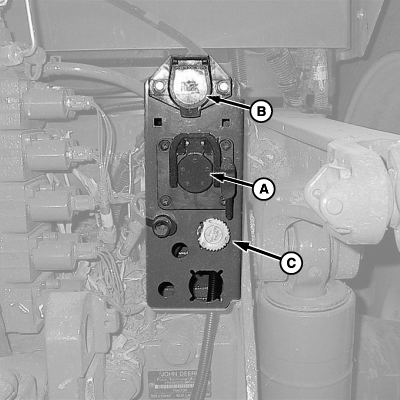
PC13526-UN-03MAY11
Rear of Tractor Shown
A - ISO Connector
B - Lighting Connector
C - 9 Pin Feedback Harness
If an electronic failure occurs, hydraulic control can be set to operate in normal, manual mode.If running an external valve, operation is not possible during an electronic failure.
Without electronic control, automatic implement steering adjustments are not possible.
Disconnection Procedure for Changing Tractor or Implement:
- Shut OFF machine, set parking brake, and remove key.
- Disconnect implement receiver harness at ISO 9 pin connector (A).
-
Disconnect constant power harness (harness not shown).
NOTE: Once completed, tractor SCV control will revert to normal
manual operation.
- Disconnect the 9 pin feedback harness (C).
- Disconnect lighting connector (B) and all other implement connections related to releasing equipment from tractor.
Disconnection Procedure for Electronic Failure:
- On Active Implement Guidance Setup Menu, select CONTROL SELECTION.
- On CONTROL SELECTION drop-down menu, select OFF.
- After OFF has been selected, cycle machine power and Active Implement Guidance will be disabled.
Disconnection Procedure for Permanent Removal:
- Shut OFF machine, set parking brake, and remove key.
- Disconnect Active Implement Guidance controller from rear of ISO connector.
- Remove controller and components following procedures in Active Implement Guidance installation instructions.
|
BA31779,00003FA-19-20120413 |