Clean Up ISOBUS VT

PC23372-UN-15NOV16
ISOBUS VT Softkey

PC15305-UN-19MAR13
Settings Icon
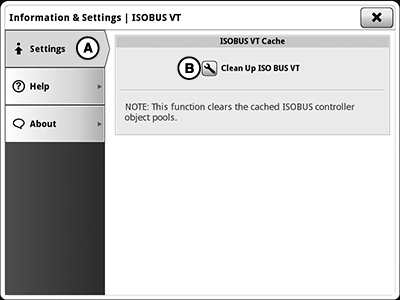
PC23373-UN-15NOV16
A - Settings Tab
B - Clean Up ISOBUS VT Button
If using a Generation 4 Display and the implement user interface does not show up or does not show up correctly, clean up ISOBUS VT. This function clears the cached ISOBUS controller object pools. Clearing the cache forces the implement controller to send its data to the display again after a restart.
Select ISOBUS VT softkey > Settings button > Settings tab (A) > Clean Up ISOBUS VT button (B)
|
RW00482,0000074-19-20161129 |