Verify Hydraulic Flow Routing and Wheel Angle Sensor Position (Implement Steering Only)

PC14926-UN-27APR12
Application Controller 1100 Button

PC12961-UN-13APR15
Setup Softkey

PC17989-UN-07NOV13
SCV Threshold Setup Button
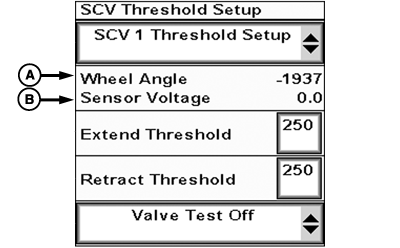
PC19767-UN-25JUL14
A - Wheel Angle Sensor Position Value
B - Sensor Voltage
Active Implement Guidance requires correct supply and return flow of hydraulic fluid for proper operation.
-
Select Application Controller 1100 Button.
-
Select Application Controller Main softkey.
-
Select SCV Threshold Setup button.
-
Extend or retract selective control valve (SCV) control lever while monitoring wheel angle sensor position value (A) and sensor voltage (B).
- SCV extend: Wheel angle and sensor voltage increases (for example, voltage changes from 2.5 to 5.0).
- SCV retract: Sensor voltage decreases (for example, voltage changes from 5.0 to 2.5).
If SCV extend or retract results in the wrong wheel angle or sensor voltage direction value, swap hydraulic lines.
-
Record sensor voltage with SCV in:
- Maximum left position (SCV retract).
- Maximum right position (SCV extend).
- Center position. Center voltage = (Maximum left position voltage plus maximum right position voltage) divided by 2.
Adjust wheel angle sensor position if:
- Implement does not travel straight at calculated center position voltage value.
- Difference between center position voltage and maximum left position voltage is less than 1 V.
- Difference between center position voltage and maximum right position voltage is less than 1 V.
|
RW00482,000007C-19-20161121 |