Data Cleanup
PC13663CC-19-24OCT13
Data Cleanup
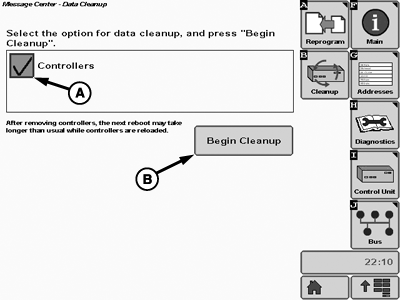
A - Controllers Checkbox
B - Begin Cleanup Button
Data cleanup function removes controller VI graphic files from the display. This can be done in case the implement's user interface does not show up anymore or if it does not show up correctly. The cleanup forces the implement controller to send its data to the display again after a restart.
Select MENU > MESSAGE CENTER > CLEANUP.
Check the box for the data to be removed and then press Begin Cleanup.
After a restart, the controller will display a bar graph in the main menu until the user interface is reloaded.
|
RW00482,0000196-19-20131024 |