Select Mode for Engagement

PC14926-UN-27APR12
Application Controller 1100 Button

PC17995-UN-07NOV13
Implement Steer Setup Button

PC17980-UN-07NOV13
Implement Shifter Setup Button
PC19640-UN-16MAY14
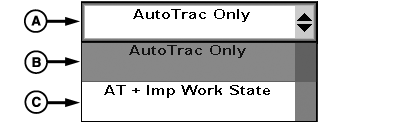
Requirement to Engage Drop-down
A - Requirement to Engage Drop-down
B - AutoTrac™ Only
C - AT + Imp Work State
To select how Active Implement Guidance engages:
-
Select Application Controller 1100 button.
-
Select Implement Steer Setup button or Implement Shifter Setup button.
-
Select Requirement to Engage drop-down (A) to change setting.
- AutoTrac™ Only (B) engages Active Implement Guidance whenever AutoTrac™ is enabled.
- AT + Imp Work State (C) engages Active Implement Guidance whenever AutoTrac™ and recording source are enabled.
(Reference display Operator's Manual to set up recording source.)
|
AutoTrac is a trademark of Deere & Company |
RW00482,000034A-19-20140716 |