Assign Selective Control Valve (SCV)
IMPORTANT:

PC14926-UN-27APR12
Application Controller 1100 Button

PC12961-UN-13APR15
Setup Softkey

PC17972-UN-07NOV13
Control Selection Button
PC19788-UN-07JUL14
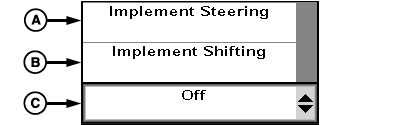
SCV 3 Control Type
A - Implement Steering
B - Implement Shifting
C - Control Mode Drop-down
SCV control type selection must match connection at implement feedback sensor harness.NOTE: For ease of instruction, this manual uses SCV 3 for Active Implement Guidance system. Operator can choose to use SCV 1 if preferred.
Assign Control Type to SCV 3:
-
Select Application Controller 1100 button.
-
Select Setup softkey.
-
Select Control Selection button.
-
Under SCV 3 Control Type, select either Implement Steering (A) or Implement Shifting (B) from drop-down (C).
-
Cycle machine power.
|
RW00482,0000392-19-20140911 |