Set Up Hydraulic Control — External Valve

PC14926-UN-27APR12
Application Controller 1100 Button

PC12961-UN-13APR15
Setup Softkey

PC17999-UN-07NOV13
External Valve Setup Button
PC18000-UN-07NOV13
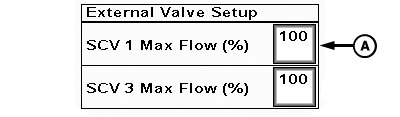
External Valve Setup
A - SCV 1 Max Flow (%)
Adjust hydraulic flow:-
Select Application Controller 1100 button.
-
Select Setup softkey.
-
Select External Valve Setup button.
(Reference Troubleshooting section if External Valve Setup button is not displayed.)
-
NOTE: Only selective control valve (SCV) 1 can be used with external valve.
Adjust SCV 1 Max Flow (%) (A) to desired value.
Max Flow can be adjusted from 10% to 100%. Size of cylinder determines best flow rate.
SCV Max Flow (%) value is defaulted to 100. Set value to 30 when getting started. Adjust value up or down depending on implement performance during operation.
NOTE: When using power beyond, hydraulic flow rate to implement is adjusted on External Valve Setup page.
|
RW00482,0000393-19-20140922 |