Optimize Terrain Compensation Module (TCM)

PC8663-UN-29APR15
Menu Button
PC13006-UN-05NOV14
StarFire™ Button

PC21154-UN-11MAY15
StarFire™ Softkey
PC21396-UN-27JUL15
PC21419-UN-30JUL15
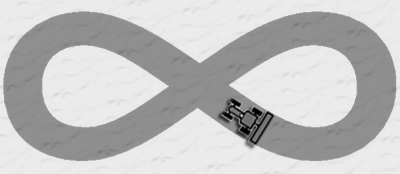
TCM Optimization Drive Pattern
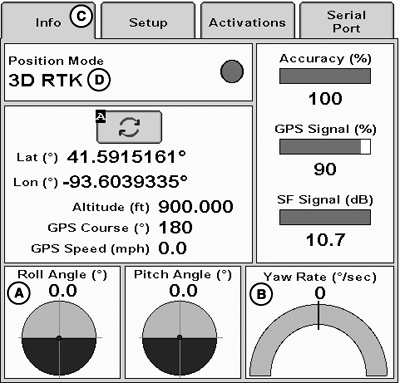
A - Roll Angle
B - Yaw Rate
C - Info Tab
D - Position Mode
Optimize TCM calibration by allowing inertial measurement unit (IMU) to measure Roll Angle (A) and Yaw Rate (B) before performing the TCM calibration.
-
Select Menu button.
-
Select StarFire™ button.
-
Select StarFire™ softkey.
-
Select Info tab (C).
-
Verify 3D position mode (D) has established SF1 signal or better.
-
Drive machine in TCM optimization drive pattern two times to allow IMU to initialize.
-
Complete TCM calibration.
(Reference Calibrate Terrain Compensation Module [TCM].)
|
StarFire is a trademark of Deere & Company |
RW00482,0000525-19-20160504 |