Optimize Tractor AutoTrac™ Performance

PC8663-UN-29APR15
Menu Button

PC12685-UN-29APR15
GreenStar™ Button

PC21148-UN-11MAY15
Guidance Softkey

PC11948-UN-30JUN09
Guidance Settings Tab
Optimize tractor AutoTrac™ performance before connecting implement. Optimizing AutoTrac™ reduces potential machine and implement counteraction that results in degraded Active Implement Guidance performance.
-
Select Menu button.
-
Select GreenStar™ button.
-
Select Guidance softkey.
-
Select Guidance Setting tab.
-

PC21902-UN-03DEC15AutoTrac™ Advanced Settings Button

PC22285-UN-16MAR16Next Page Button

PC22286-UN-16MAR16Monitor Performance Button
Select AutoTrac™ Advanced Settings button. -
Select Next Page button (page 2).
-
Select Monitor Performance button.
-
PC22287-UN-16MAR16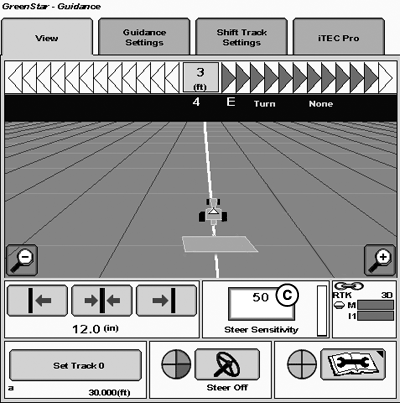
PC22289-UN-16MAR16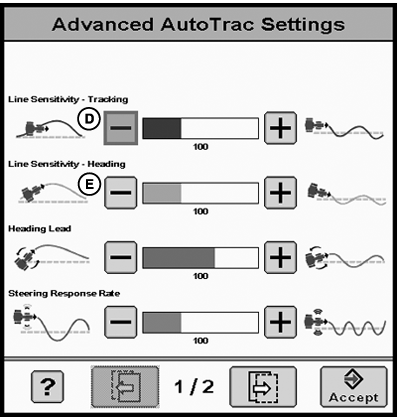
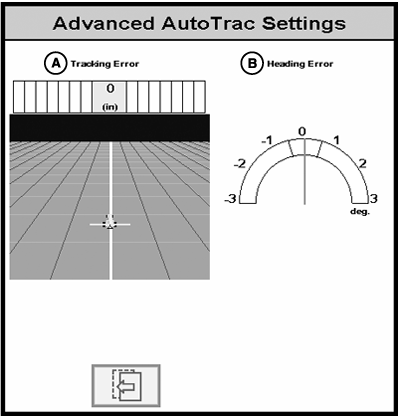
PC22288-UN-16MAR16A - Tracking Error
B - Heading Error
C - Steering Sensitivity
D - Adjust Line Sensitivity – Tracking
E - Adjust Line Sensitivity – Heading
Acquire line and drive for 30 seconds. -
NOTE: Values closest to zero error are preferred and indicate better system performance.
Use the two graphs to monitor Tracking Error (A) and Heading Error (B) for 30 seconds.
-
NOTE: Adjust Steering Sensitivity (C) to preferred performance before adjusting line sensitivity tracking and heading settings.
Adjust Line Sensitivity – Tracking (D) for tracking error.
Adjust Line Sensitivity – Heading (E) for heading error.
Adjust settings until preferred performance is achieved. Overall performance may be affected by global positioning system (GPS) signal accuracy and machine condition.
|
AutoTrac is a trademark of Deere & Company GreenStar is a trademark of Deere & Company |
RW00482,00005B1-19-20160316 |