Adjust Selective Control Valve (SCV)
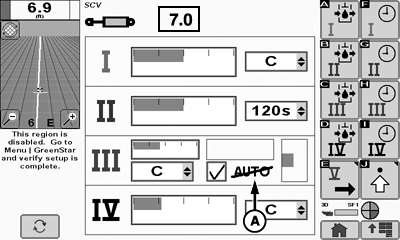
PC22224-UN-26FEB16
GreenStar™ 3 CommandCenter™
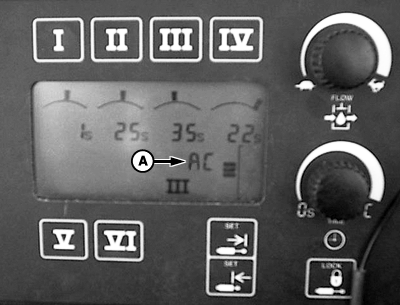
PC22225-UN-26FEB16
TouchSet™
A - Auto Mode Indicator
 CAUTION: Excessive SCV flow rate settings can cause sudden machine
movement when cylinder is operated. Verify bystanders are clear of
machine to avoid injury before engaging SCV button to check current
flow rate. Full extension or retraction of cylinder should take approximately
2 seconds.
CAUTION: Excessive SCV flow rate settings can cause sudden machine
movement when cylinder is operated. Verify bystanders are clear of
machine to avoid injury before engaging SCV button to check current
flow rate. Full extension or retraction of cylinder should take approximately
2 seconds.
To display auto mode indicator (A), automatic SCV control requires:
- Application controller installed.
- Control type selected for SCV 1 or 3.
(Reference Configure Control Type to select a control type.)
Automatic SCV control activates when SCV is placed in forward detent position.
- CommandCenter™—AUTO with a strike through it indicates auto mode is not active. !AUTO! indicates a fault and auto mode is inoperable. AUTO indicates normal auto mode operation.
- TouchSet™—EC indicates auto mode is not active. AC indicates normal auto mode operation.
An SCV’s detent flow setting applies to both extend and retract. The application controller automatically controls detent time when a control type is selected and auto mode is engaged.
Adjust detent flow for each operation.
(Refer to machine Operator's Manual for more information on SCV controls.)
SCV can be operated to observe flow rate while in adjustment mode.
|
SCV Flow Output (Approximate) |
||
|---|---|---|
|
SCV Flow Settings |
Flow |
|
|
L/min. |
gpm |
|
|
0.1 1 |
— |
— |
|
1.0 |
3.6 |
1.0 |
|
2.0 |
7.2 |
1.9 |
|
3.0 |
10.2 |
2.7 |
|
4.0 |
14.4 |
3.8 |
|
5.0 |
19.2 |
5.0 |
|
6.0 |
24.0 |
6.4 |
|
7.0 |
31.2 |
8.2 |
|
8.0 |
39.6 |
10.5 |
|
9.0 |
65.4 |
17.2 |
|
10.0 |
114 |
30.0 |
GreenStar™ 3 CommandCenter™
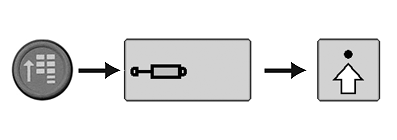
RXA0117610-UN-10JUN11
CommandARM™ Menu Button > SCV Button > Advanced Settings Softkey
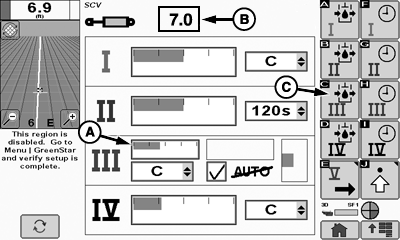
PC22226-UN-10MAR16
SCV Home Page
A - Detent Flow Bar Graph
B - Detent Flow Value Box
C - Extend Set Softkey
-
Select Menu button.
-
Select SCV button.
-
Select Advanced Settings softkey.
-
NOTE: Bar graph (A) depicts detent flow (B).
Select Extend Set softkey (C) for SCV being used, to navigate to detent flow bar graph. Select Confirm button to highlight. Rotate thumb wheel to adjust flow, then select Confirm button.
TouchSet™ Display
PC17987-UN-07NOV13
PC17988-UN-07NOV13
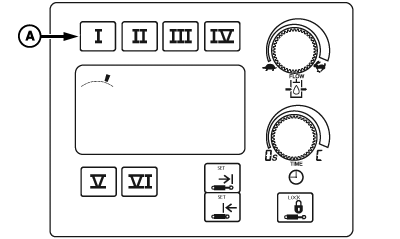
A - SCV Selection Buttons
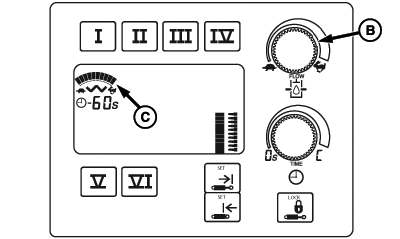
B - Flow Adjustment Dial
C - Bar Graph
-
Select button (A) for SCV being used. Screen under SCV selection buttons displays previous flow rate.
NOTE: As operator turns flow adjustment dial (B), the number of line segments increases or decreases as flow changes.
-
Turn flow adjustment dial clockwise to increase flow or counterclockwise to decrease flow. Flow setting is displayed on bar graph (C) when adjustments are made.
|
GreenStar is a trademark of Deere & Company TouchSet is a trademark of Deere & Company CommandCenter is a trademark of Deere & Company CommandARM is a trademark of Deere & Company 1 0.1 = Minimum Flow Setting |
RW00482,00005DA-19-20160316 |