Optimize Active Implement Guidance

PC8663-UN-29APR15
Menu Button

PC14926-UN-27APR12
Application Controller 1100 Button

PC13072-UN-16NOV10
Application Controller Main Softkey

PC17968-UN-07NOV13
Implement Steer Setup Button
PC22590-UN-03MAY16
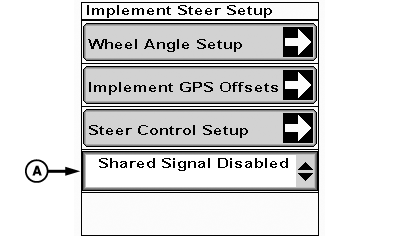
A - Shared Signal Drop-down
To optimize guidance line tracking, utilize real time kinematics (RTK) receivers on both machine and implement. Once receivers are set up, disable shared signal so each receiver uses its own RTK signal to track guidance lines.
-
Select Menu button.
-
Select Application Controller 1100 button.
-
Select Application Controller Main softkey.
-
Select Implement Steer Setup button.
-
Select Shared Signal Disabled from drop-down (A).
|
RW00482,000068A-19-20160503 |