Attach Loader—540M Loaders
 CAUTION:

W27982-UN-30MAY17
A - Pin (1 each side)
B - Saddle (1 each side)
Prevent bodily injury. DO NOT allow bystanders nearby while attaching the loader. Allow only the tractor operator to attach the loader.IMPORTANT: Prevent possible hydraulic hose damage. Make sure that the loader hydraulic hoses do not interfere with the tractor when attaching the loader.
-
Center the tractor between the loader masts, stopping when both mounting frame saddles (B) are positioned under pins (A) on the loader masts.
-
CAUTION:
Escaping fluid under pressure can penetrate the skin causing serious injury. Avoid the hazard by relieving pressure before connecting hydraulic or other lines. Protect hands and body from high-pressure fluids. See additional information, Avoid High-Pressure Fluids in Safety section.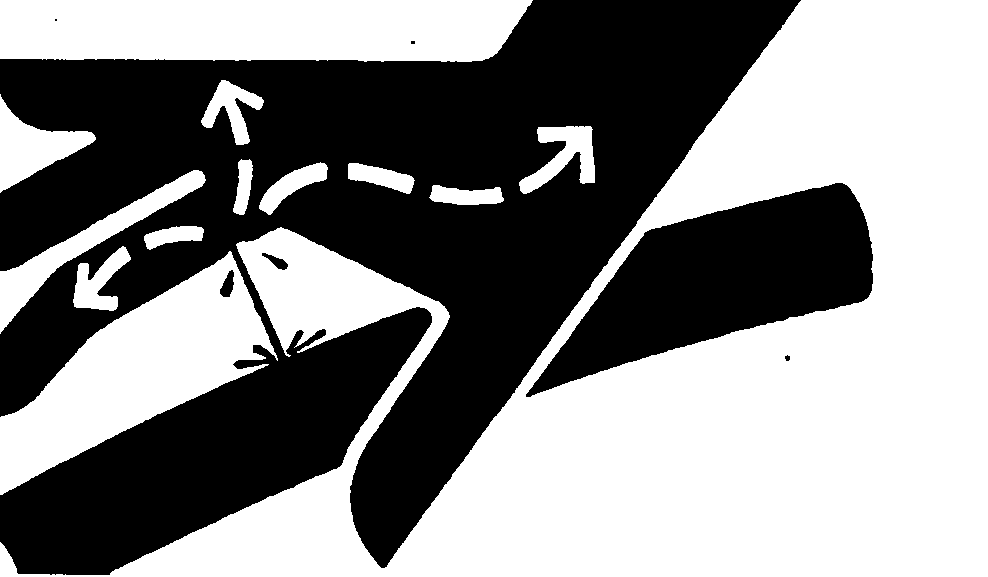
X9811-UN-23AUG88Prevent possible bodily injury from unexpected loader movement. Lower loader to ground before relieving pressure.
Prevent possible bodily injury from unexpected loader movement. Lock out loader controls before attaching loader.
Place transmission in PARK and shutoff engine.
-
Relieve hydraulic pressure. (See Relieve Hydraulic Pressure in Controls section.)
-
Lock out loader controls: Controls vary by tractor and options. (See your tractor Operator’s Manual for more information.)
-
W21694-UN-08NOV11Multicoupler
W21695-UN-08NOV11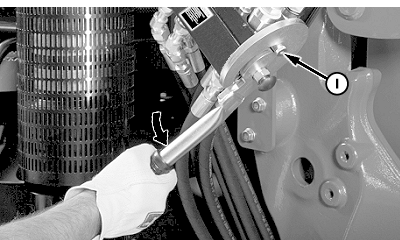
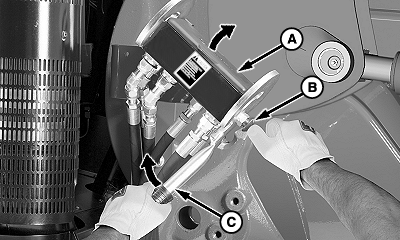
W21696-UN-08NOV11A - Cover
B - Knob
C - Handle
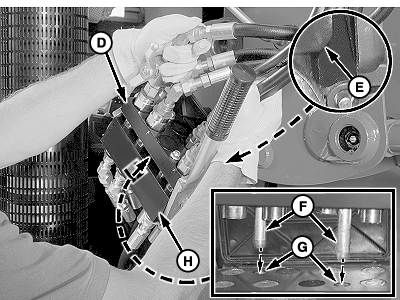
D - Coupler, Loader Half
E - Chamfered Edge
F - Locating Pins
G - Holes
H - Coupler, Tractor Half
I - Pin (1 each side)
Connect hydraulics using multicoupler:-
Push in knob (B) and rotate handle (C) upward.
-
Lift cover (A) and insert loader coupler (D), with the chamfered edge (E) toward cover, onto tractor coupler (H). Make sure that locating pins (F) on the loader coupler fit into corresponding holes (G) in the tractor coupler.
-
Rotate handle downward to engage pins (I) and lock the coupler halves together.
-
-
CAUTION:
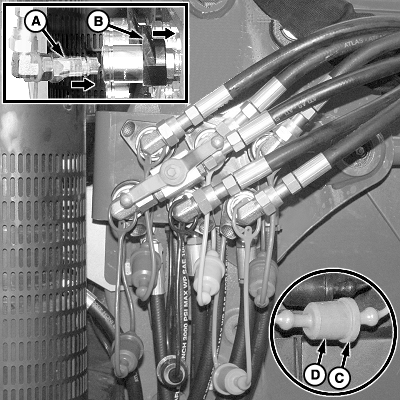
W24621-UN-12DEC13Mid-Mount Couplers
A - Coupler, Male
B - Coupler, Female
C - Plug
D - Cap
Prevent possible injury from unexpected loader movement. Hose connections must be correct for the loader to respond as expected when the controls are moved.IMPORTANT: Prevent possible hydraulic system contamination. Before connecting coupler halves make sure that fittings are free of dirt and debris. Verify that hoses are not twisted or kinked.
NOTE: Hose connections have color-coded caps and plugs. (If caps and plugs are missing, see Identify Hose Connections in the Service section.)
Connect hydraulics using mid-mount couplers:
-
Push and hold collar on female coupler (B).
-
Match color-coded cap on the hose end with the same color-coded plug on the coupler. Insert hydraulic hose with male coupler (A) into female coupler.
-
Release collar on the female coupler.
-
Connect color-coded plug (C) and cap (D) together.
-
Repeat connections for all the couplers.
-
-
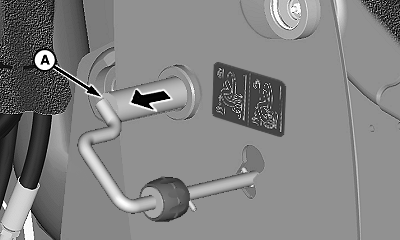
W23855-UN-30SEP13Right-Hand Side Shown
A - Mast Pin (1 each side)
Make sure that mast pins (A) on both sides are retracted (pulled out) as shown. -
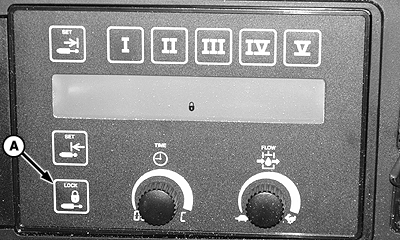
W07641-UN-12NOV05SCV Lock Switch On SCV TouchSet™ Panel
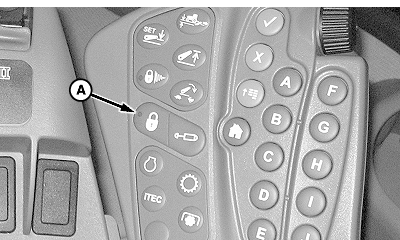
W20496-UN-10AUG09SCV Lock Switch On CommandARM™
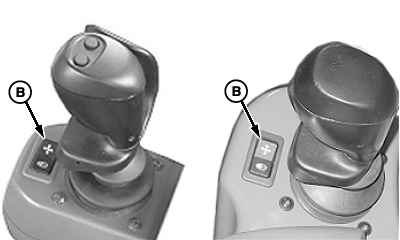
W21619-UN-22JUN11Multi-Function Lock Switch Located on Lever Console
A - Transport Lock Switch (SCV and multi-function lever)
B - Transport Lock Switch (multi-function lever only)
Start engine. -
Place transmission in NEUTRAL to allow for tractor movement.
-
Unlock loader controls: Controls vary by tractor and options. (See your tractor Operator’s Manual for more information.)
- Tractors with SCV finger pad controls: Press transport lock switch (A).
- Tractors with a multi-function lever: Press transport lock switch (B).
-
W20794-UN-11MAY10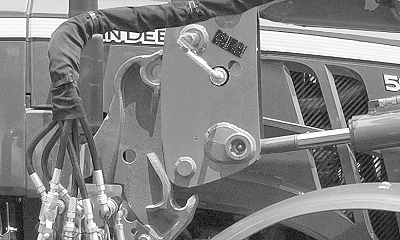
W24642-UN-31JAN14Right-Hand Side Shown
W24643-UN-31JAN14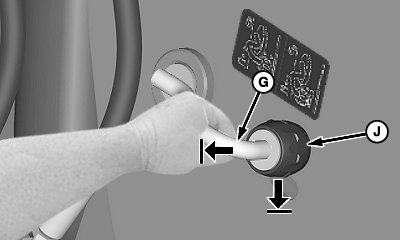
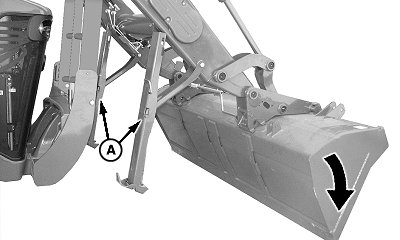
W24094-UN-05FEB14A - Parking Stands
B - Mast (1 each side)
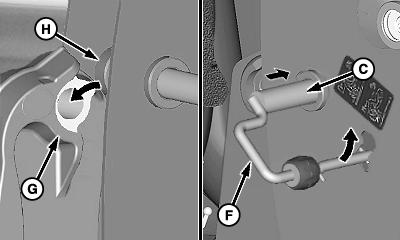
C - Mast Pin (1 each side)
D - Pin (1 each side)
E - Saddle (1 each side)
F - Handle (1 each side)
G - Cradle (2 per side)
H - Bushing (2 per side)
I - Knob (1 each side)
Extend bucket cylinders until mast (B) lowers, pins (D) rest in saddles (E) on both sides, and parking stands (A) are slightly off the ground. -
Retract lift cylinders until mast bushings (H) are seated in cradles (G) on both mounting frames.
-
Place transmission in PARK and shutoff engine.
-
Install mast pins (C) on both sides of the loader :
-
Push in mast pin and rotate handle (F) upward until the knob locks into the mast.
-
Make sure that knob (I) is securely locked in the top hole of the mast, pull on the pin handle while attempting to rotate downward. (Knob is locked if the handle does not move.)
-
-
CAUTION:
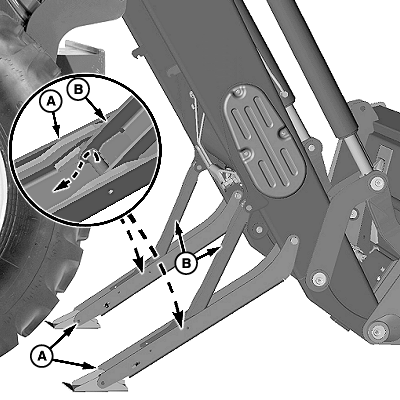
W26401-UN-21OCT14Right-Hand Side Shown
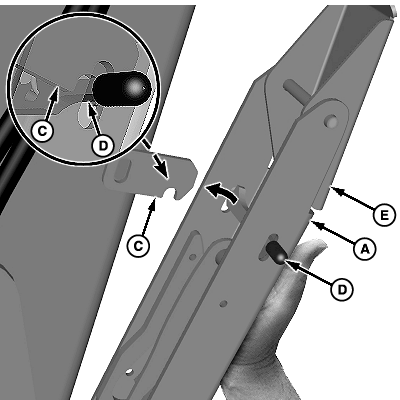
W21698-UN-23AUG11A - Parking Stands
B - Supports
C - Latch Plate
D - Latch
E - Foot Plate
Prevent bodily injury, keep hands and fingers away from the sides of parking stand (A) and foot plate (E) when storing the parking stands.NOTE: Original parking stands with a foot plate shown. Later versions do not include a foot plate.
Store loader parking stands:
-
Pull out support (B) and slide down parking stand (A).
-
Lift parking stand and push upward toward the bottom of the boom.
-
Push parking stand inward until latch (D) engages latch plate (C), locking the parking stand in place.
-
Repeat steps on the opposite side.
-
-
Check loader operation and performance.
|
TouchSet is a trademark of Deere & Company CommandARM is a trademark of Deere & Company |
OUO6064,0001CEA-19-20170718 |