Adjusting Seat-Mechanical Suspension Seat-Later Model Tractor
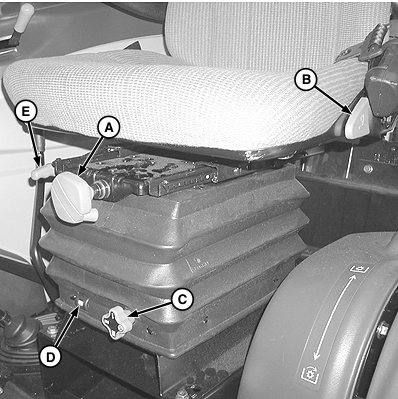
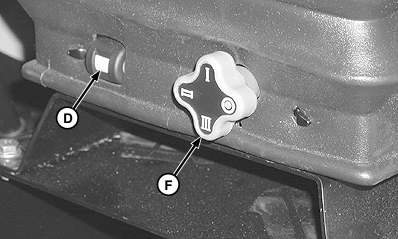
NOTE: Use these instructions as a guideline. Since everybody is different, the final settings must be determined by personal preferences. Each operator should make adjustments that suit them best. The weight adjustment should be performed each time the height adjustment is changed. To adjust the seat forward or backward, lift the forward/backward adjustment lever (E), move the seat to the desired position and release lever to lock in position. To adjust the height, move the height adjustment lever (C), while the driver is seated, to one of four possible positions. This sets the limit for how high the seat will travel (with no weight on seat). The indicated height setting (F) is closest to the ground.
NOTE: If the height adjustment lever (C) is locked and won't rotate, turn the weight adjustment lever (A) to a lighter setting or force seat lower. Then after setting height, adjust the weight while driver is seated. Turn the weight adjustment lever (A) clockwise to increase load and counterclockwise to decrease load. When the seat is set to the weight of the operator, the indicated height setting (F) appears through the display window (D). This adjustment sets the seat suspension at its mid-point of travel. To adjust the backrest, lift the backrest adjustment lever (B), move the backrest to the desired position and release lever to lock in position. |
|
 CAUTION:
Adjustments to the seat must not be made while driving.
CAUTION:
Adjustments to the seat must not be made while driving.
OUO1080,00002B1 -19-14NOV03-1/1 |