Cleaning Transmission-Hydraulic Oil Pickup Screen
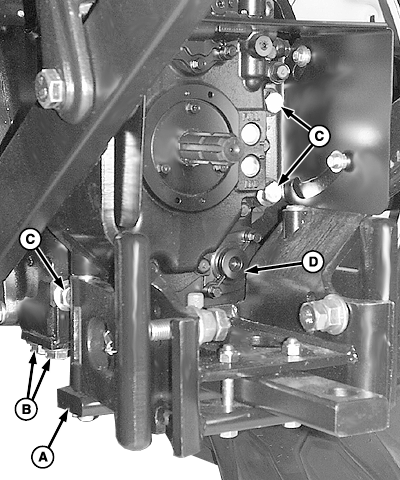
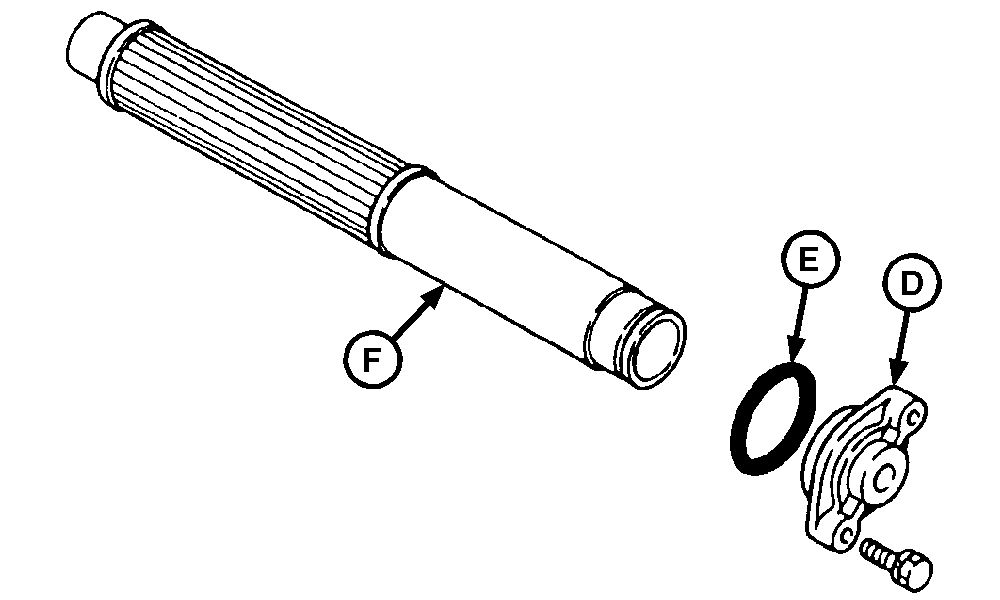
NOTE: Hitch arms are in raised position for clarity of photo. 1. Drain transmission-hydraulic oil. (See CHANGING TRANSMISSION-HYDRAULIC OIL AND FILTER in this section.) 2. Remove four cap screws (B) (drawbar support-to-bottom of differential housing). 3. Remove six cap screws (C) (drawbar suppport-to-back of differential housing) and drawbar support (A). 4. Remove cap screws, pickup screen cover (D), O-ring (E), and pickup screen (F). Examine pickup screen for damage; replace if necessary. Clean pickup screen in solvent and blow dry with compressed air. 5. Inspect O-ring (E) for damage. Replace if necessary. 6. Carefully install screen so the front of screen is inserted in hole at front of differential case. 7. Install O-ring, cover and cap screws. 8. Install drawbar support and cap screws. Tighten cap screws to specification. Specification
9. Fill system with transmission-hydraulic oil. (See CHANGING TRANSMISSION-HYDRAULIC OIL AND FILTER in this section.) |
|
OUMX005,0001A95 -19-10SEP04-1/2 |
|
10.
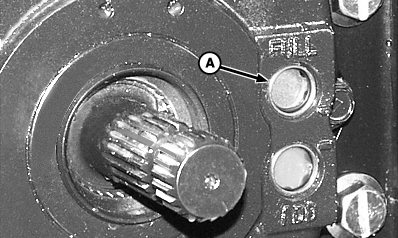
Check oil level at sight glass (A) after filling, and again after operating for five minutes.
|
|
OUMX005,0001A95 -19-10SEP04-2/2 |