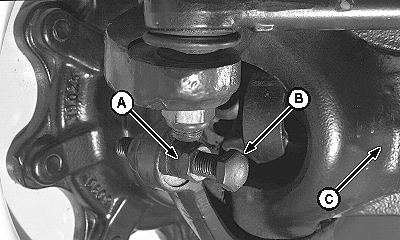
Set MFWD Steering Stops Turning Radius1. Raise and support front of tractor so MFWD axle can be oscillated to its stops.2. Slowly turn steering wheel to the left until steering cylinder travel has reached its limit, the steering stops, or the tires are within 25 mm (1 in.) of grille screen or side panels. 3. Raise left side of axle against its stop and measure clearance between tire and nearest tractor component. The distance should not be less than 25 mm (1 in.). 4. Loosen lock nut (A) on steering stop and adjust steering stop bolt (B) so it touches steering stop (C). It may be necessary to shorten stop bolt (B) in order to obtain maximum turning angle. 5. Tighten steering stop bolt retaining lock nut (A) to specifications. Specification
6. Turn wheel fully to the left. Impact knuckle housing to steering stop five times. 7. Tighten steering stop bolt retaining nuts again to specification. 8. Repeat above steps for right side. NOTE: Wide tread settings and large tire sizes will increase turn radius slightly. |
|
LV,5010WT,E -19-07DEC06-1/1 |