Checking and Adjusting Clutch Pedal Free Play (SyncShuttle™ Transmission)
Straddle Mount and Hi-Crop 1. Measure distance from firewall-to-edge of clutch pedal arm (A). 2. Depress clutch pedal (bold arrow) until resistance is felt and measure same distance. The difference between the recorded measurements is clutch pedal free play. If free play is not within specification, adjust clutch linkage. Specification
3. Remove cover (B) and clip pin (D). 4. Loosen jam nut (C). |
|
||||||||||||||||||
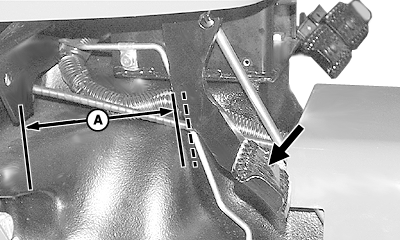
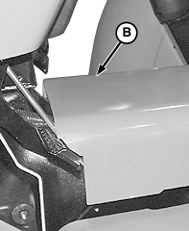
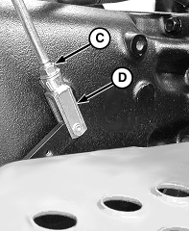
OUO1023,0002862 -19-03APR06-1/3 |
|
5.
Push and hold clutch lever forward until resistance is felt.
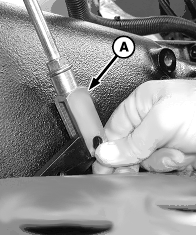
6. Rotate clevis (A) in or out until clevis and clutch lever holes align. 7. Move clevis away from clutch lever and rotate clevis counterclockwise 2-1/2 turns. 8. Align clevis with clutch lever and install clip pin. 9. Tighten jam nut and install cover.
|
|
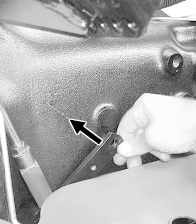
OUO1023,0002862 -19-03APR06-2/3 |
|
Cab and IOOS
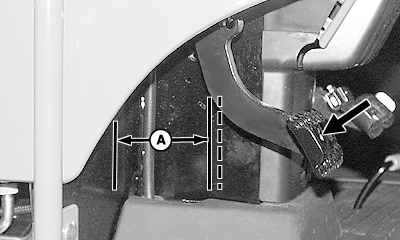
NOTE: IOOS shown; cab tractor similar. Left console panel removed for clarity of photo. Measure distance from firewall-to-edge of clutch pedal arm (A). Depress clutch pedal (bold arrow) until resistance is felt and measure same distance. The difference between the recorded measurements is clutch pedal free play. If free play is not within specification, adjust clutch linkage. Specification
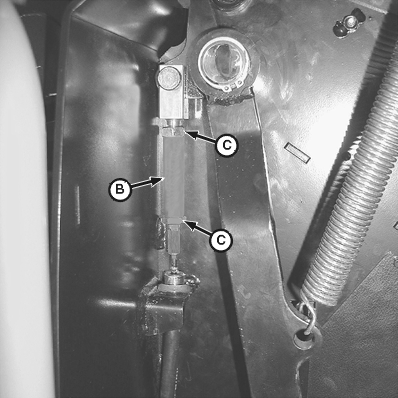
2. Turn turnbuckle (B):
3. Tighten jam nuts.
|
|
OUO1023,0002862 -19-03APR06-3/3 |