Tread Settings-Multi-Position MFWD WheelsWheel tread on MFWD axle with multi-position wheels can be adjusted by repositioning or exchanging the rims or by reversing the wheel disks. Wheel tread can also be adjusted by exchanging the complete wheel to the opposite side of the tractor. (This maneuver permits the change from disk-dished-in to disk-dished-out operations without disassembling the wheel). When changing MFWD wheels from one side to the other, the arrow on side wall of tire points in the direction of forward rotation. In certain applications, MFWD equipped tractors may operate with the arrows in the opposite direction. (See Selecting Front Tire Rolling Direction in this section.) The relationship of the wheel disk and rim in obtaining the different tread settings is shown in the diagrams. A study of these diagrams, before attempting to change tread settings, will save unnecessary labor. Tread settings are measured at the middle of the tires at axle height . IMPORTANT: After setting wheel spacing, tighten MFWD wheel rim-to-disk bolts and MFWD wheel disk-to-hub bolts to specification. Drive tractor 100 m (109 yd) and tighten again.
Specification
|
|
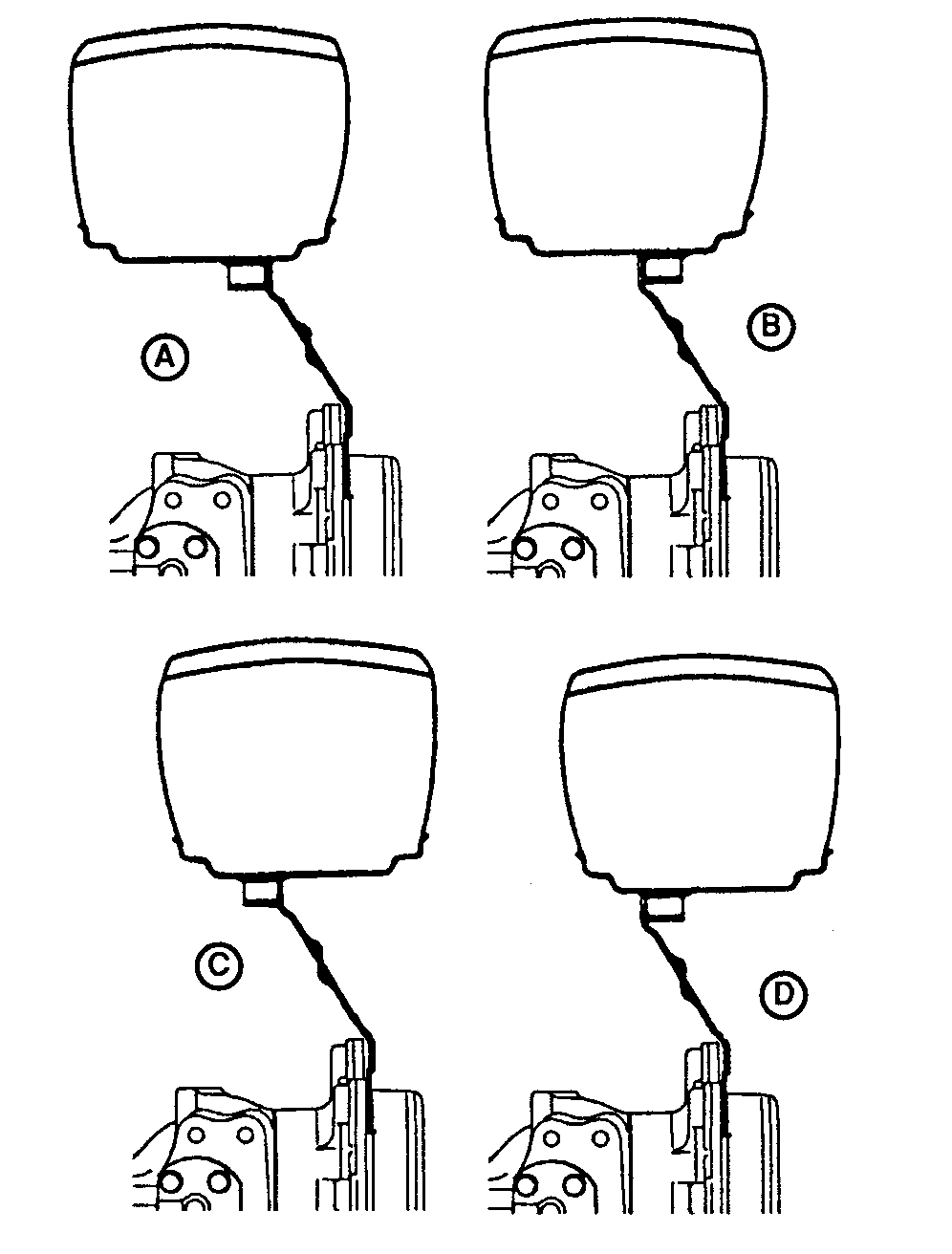
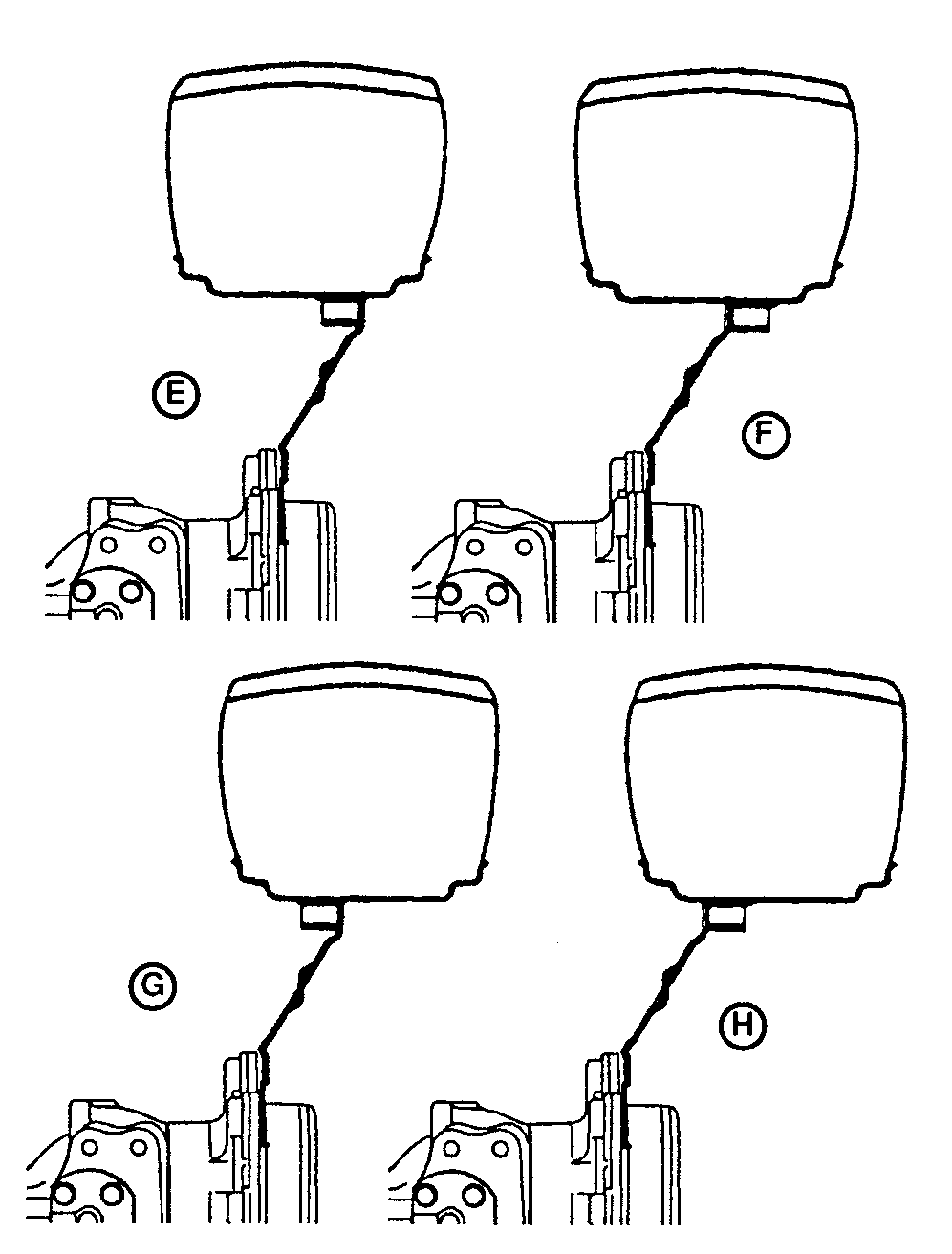
OUO1023,00029EB -19-18OCT06-1/2 |
| MULTI-POSITION MFWD WHEELS-TREAD WIDTH (Centerline-to-Centerline) | ||||||||
|---|---|---|---|---|---|---|---|---|
| Diagram | ||||||||
| Tire | A | B | C | D | E | F | G | H |
| 9.5-16 6PR R3 | INTa | N/A | N/A | N/A | 1730 mm (68.1 in.) | N/A | N/A | N/A |
| 12LL-16 6PR Turf Special | INTa | N/A | N/A | N/A | 1691 mm (66.6 in.) | N/A | N/A | N/A |
| 12.5/80-18 10PR I3 | 1564 mm (61.6 in.) | N/A | N/A | N/A | 1731 mm (68.2 in.) | N/A | N/A | N/A |
| 8.3-24 4PR R1 and R3 | 1367 mm (53.8 in.) | 1480 mm (58.3 in.) | 1519 mm (59.8 in.) | 1632 mm (64.3 in.) | 1667 mm (65.6 in.) | 1780 mm (70.1 in.) | 1819 mm (71.6 in.) | 1932 mm (76.1 in.) |
| 9.5-24 6PR R1 | 1367 mm (53.8 in.) | 1480 mm (58.3 in.) | 1519 mm (59.8 in.) | 1632 mm (64.3 in.) | 1667 mm (65.6 in.) | 1780 mm (70.1 in.) | 1819 mm (71.6 in.) | 1932 mm (76.1 in.) |
| 11.2-24 6PR R1 | 1342 mm (52.8 in.) | 1454 mm (57.2 in) | 1545 mm (60.8 in.) | 1657 mm (65.2 in.) | 1642 mm (64.6 in.) | 1754 mm (69.1 in.) | 1845 mm (72.6 in.) | 1957 mm (77.0 in.) |
| 12.4-24 6PR R1 | 1342 mm (52.8 in.) | 1454 mm (57.2 in) | 1545 mm (60.8 in.) | 1657 mm (65.2 in.) | 1642 mm (64.6 in.) | 1754 mm (69.1 in.) | 1845 mm (72.6 in.) | 1957 mm (77.0 in.) |
| 13.6-24 6PR R1 | 1354 mm (53.3 in.) | 1453 mm (57.2 in.) | 1546 mm (60.9 in.) | 1645 mm (64.8 in.) | 1654 mm (65.1 in.) | 1753 mm (69.0 in.) | 1846 mm (72.7 in.) | 1945 mm (76.6 in.) |
| MULTI-POSITION VEGGIE WHEEL-TREAD WIDTH (Centerline-to-Centerline) | ||||||||
| Diagram | ||||||||
| Tire | A | B | C | D | E | F | G | H |
| 9.5R32 4Star R1b | 1277 mm (50.3 in.) | 1375 mm (54.1 in.) | 1516 mm (59.7 in.) | 1614 mm (63.5 in.) | 1685 mm (66.3 in.) | 1783 mm (70.2 in.) | 1924 mm (75.7 in.) | 2022 mm (79.6 in.) |
| MULTI-POSITION HI-CROP WHEELS-TREAD WIDTH (Centerline-to-Centerline) | ||||||||
| Diagram | ||||||||
| Tire | A | B | C | D | E | F | G | H |
| 13.6-38 6PR R2 | INTa | 1402 mm (55.2 in.) | 1500 mm (59.1 in.) | 1602 mm (63.1 in.) | 1700 mm (66.9 in.) | 1802 mm (70.9 in.) | 1900 mm (74.8 in.) | 2002 mm (78.8 in.) |
| 230/95R40 2Star R1 | INTa | 1303 mm (51.3 in.) | 1599 mm (63.0 in.) | 1636 mm (64.4 in.) | 1666 mm (65.6 in.) | 1703 mm (67.0 in.) | 1999 mm (78.7 in.) | 2036 mm (80.2 in.) |
| aInterference (do not use) | ||||||||
| bNot Available with Cab or IOOS | ||||||||
OUO1023,00029EB -19-18OCT06-2/2 |