Operating Automatic Temperature Control (ClimaTrak™ ATC)
RXA0099741-UN-07NOV08
CommandCenter Menu Icon
RXA0100896-UN-06MAR09
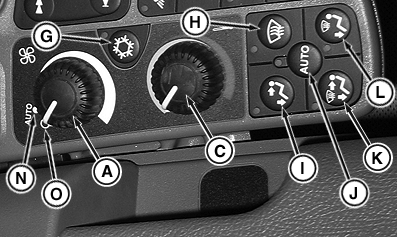
CommandArm Controls
RXA0101041-UN-19MAR09
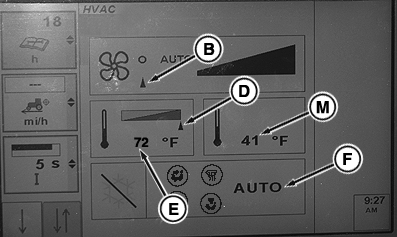
CommandCenter HVAC Page
A - Fan Control Knob
B - Fan Setting Indicator Arrow
C - Temperature Setting Knob
D - Temperature Indicator Arrow
E - Set Point Temperature Display
F - HVAC Mode
G - Air Conditioner Control Button
H - Defrost
I - Cab And Floor
J - Auto
K - Defrost, Floor And Cab
L - Defrost And Floor
M - Ambient Temperature
N - Auto
O - OFF
CLIMATRAK is controlled through the CommandARM™ Controls and settings displayed on the CommandCenter™. Changes made through CommandArm Controls results in CommandCenter displaying HVAC page.Rotate fan control knob (A) adjusts fan speed. Fan indicator arrow (B) moves in relation to fan speed.
Turn temperature control knob (C) to red zone for heating or blue zone for cooling. Temperature display (E) indicates current cab temperature. Ambient temperature (M) is displayed at CommandCenter right side.
The bottom portion of display (F) indicates which of several modes the heating and cooling unit is currently operating in. Pressing buttons (G through L) changes the display and operating mode. Selecting defrost or air flow options will automatically enable compressor. Listed below is each of those modes.
- Air Conditioner Control Button (G) turns air conditioner on and off.
- Defrost (H) turns on defroster and directs air flow to windshield.
- Cab and Floor (I) directs air flow at operator chest and feet simultaneously.
- Auto (J) automatically adjust direction of air flow.
- Defrost and Cab (K) directs cab air temperature to operator and windshield simultaneously.
- Defrost and Floor (L) directs cab air temperature to footwell and windshield simultaneously.
|
ClimaTrak is a trademark of Deere & Company CommandARM is a trademark of Deere & Company CommandCenter is a trademark of Deere & Company |
OURX935,00000BE-19-20090916 |