Programmable Lights
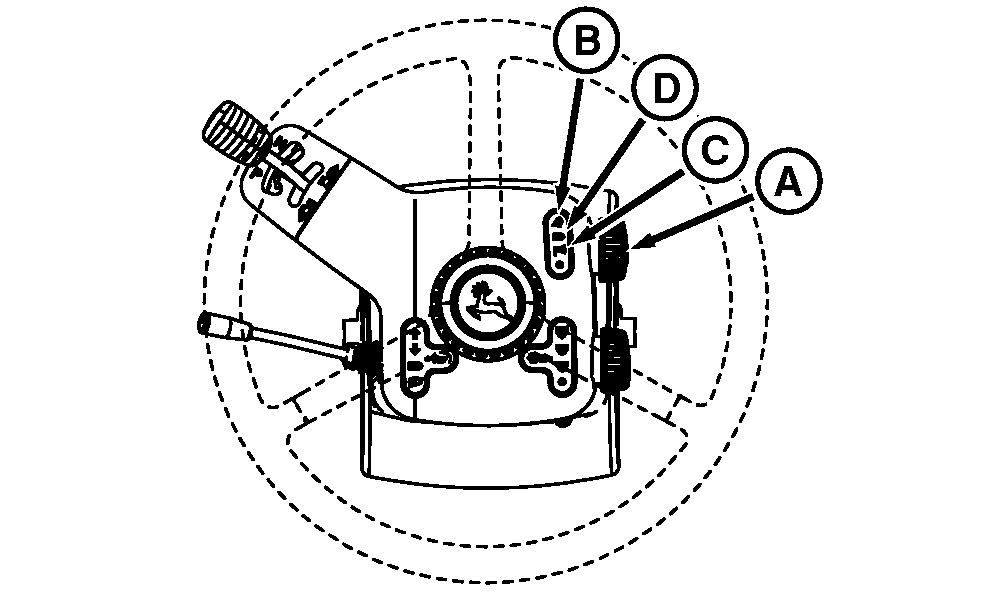
RXA0098075-UN-18DEC08
Steering Wheel
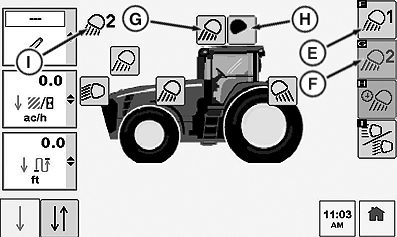
RXA0100034-UN-18FEB09
CommandCenter™ Lighting Page
A - Selector Knob
B - Field Lights
C - Parking Lights
D - Road Lights
E - Field Position 1 Soft Key
F - Field Position 2 Soft Key
G - Light in ON Position
H - Light OFF Position
I - Field Position Indicator
On steering wheel, turn selector knob (A) to either road lights (D) which control head lights. Field Lights (B) which control cab belt line lights, rear fender lights and cab roof line lights or park lights (C) which control the front clearance and brake lights only.Operation of all clear-lens lighting Field Lights is programmable using the light switches on the steering wheel and CommandCenter pages. See Road And Field Light Identification With Commandcenter Indicators for further information on lights and display indicators.
Light display shows for 10 seconds whenever light switch is changed to a programmable setting. If no changes are made, display returns to last screen shown. Light indicators change from black-to-white when programmed ON.
OFF Position:
In the OFF position, all clear-lens lighting is programmed OFF (all black indicators). Changes to ON/OFF settings take place immediately.
Field Positions:
Turn light switch (A) to desired position and observe CommandCenter page. Selecting Field Position 1 soft key (E), controls field position 1 lights. Selecting Field Position 2 soft key (F), controls field position 2 lights. Selecting individual lights toggle lights on (G) or off (H). Indicator (I) informs operator which field position is currently being viewed.
Normally one field light position is programmed to operate only certain lights, such as rear facing field lights. Moving dimmer switch to high beam will give a second option to program lights such as all rear facing lights and side mounted roof lights. The other field position is used to operate all clear-lens lighting and again moving the dimmer switch will allow for a fourth option for programmable lighting.
While operating in the field, pressing Cab Switch Menu Lights Icon will display a quick view ( 3 seconds) of what lights are on before defaulting back to previous page displayed on CommandCenter™.
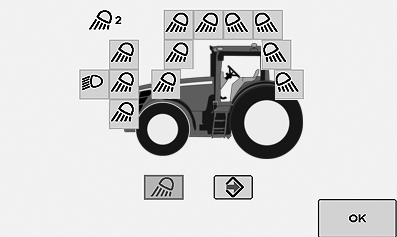
RXA0100801-UN-25FEB09
Lighting Quick Look
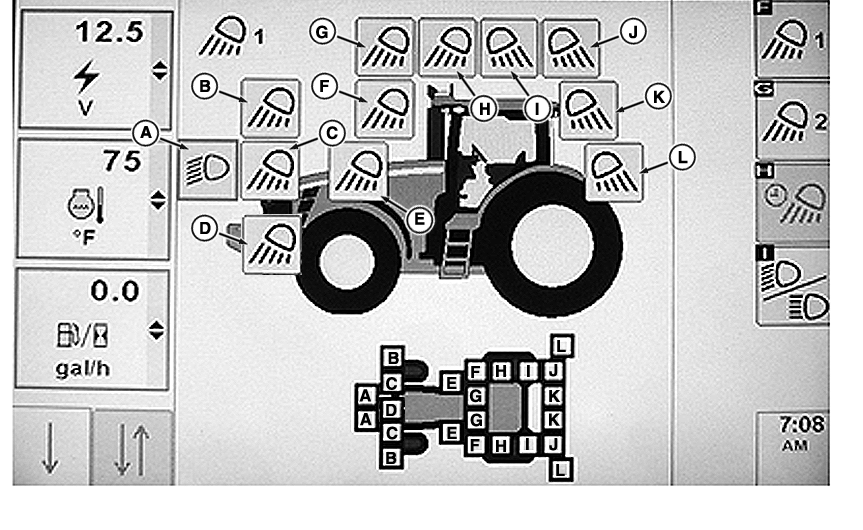
Attached is a diagram to assist in programmable lights placement and identification.
RXA0101129-UN-19MAR09
COMMANDCENTER LIGHTING PAGE
A - Headlights
B - Front Outer Lights
C - Front Inner Lights
D - Center Spot Light (Optional)
E - Mid-Body Flood
F - Front Inner Roof (Optional Flood)
G - Front Outer Roof
H - Front Side Roof
I - Rear Side Roof
J - Rear Outer Roof
K - Rear Inner Roof
L - Rear Fender Flood
|
CommandCenter is a trademark of Deere & Company |
OURX935,0000B4C-19-20090916 |