Road and Field Light Identification and CommandCenter™Indicators
RXA0102055-UN-09APR09
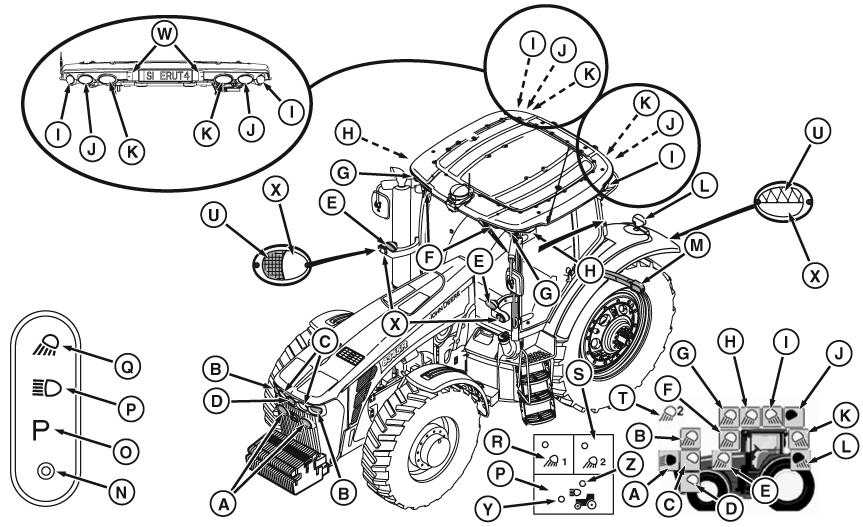
A - Head Lights
B - Front Outer Flood Lights
C - Front Inner Flood Lights
D - Spot Light (Optional)
E - Mid Body Flood
F - Front Inner Roof
G - Front Outer Roof
H - Front Side Roof Flood
I - Rear Side Roof Flood
J - Rear outer Roof
K - Rear Inner Roof
L - Rear Fender Flood
M - Extremity Transport Lights
N - Light, OFF Position
O - Lights, Park Position
P - Road Lights
Q - Field Lights
R - Field Lights 1
S - Field Lights 2
T - Indicator, Field Light Position
U - Amber Hazard Lights
V - Clearance Lights
W - License Plate With Lamp
X - Front Clear Lens/Rear Red Lens
Y - Road Lights Indicator
Z - Loader Lights Indicator
 CAUTION: Avoid injury caused by accidental collision with another
vehicle. Always comply with traffic regulations when driving tractor
on a road. Dim headlights to low-beam for oncoming vehicles. Avoid
using Field Lights which could blind or confuse other drivers.
CAUTION: Avoid injury caused by accidental collision with another
vehicle. Always comply with traffic regulations when driving tractor
on a road. Dim headlights to low-beam for oncoming vehicles. Avoid
using Field Lights which could blind or confuse other drivers.
Standard Lighting has four positions (N—Q) and operates regardless of key position.
0 (OFF) Position (N):
Turns all lights off.
NOTE: Refer to Programming Field Lights for lighting set-up information. Programmable lighting display is at the lower right-hand corner of the previous picture. Programmable lights are A through L.
Park Position (O:
Turns on red tail lights.
Road Position (P):
Selected by turning knob on upper right steering column and observed at CommandArm Controls lower right side.
Turns on high/low beam Head Lights (A), tail lights (L), and extremity lights (M).
If tractor is equipped with loader lights, pressing Road Position button (P) allows lights to be toggled between road light indicator (Y) and loader light indicator (Z). If tractor is not equipped with loader lights, only light indicator (T) will be on when hood lights are on.
Field Position (Q) :
Selected by turning knob on upper right steering column and observed at CommandArm Controls lower right side.
Turns on clear-lens lighting (A through L) programmed for either field position 1 (R) or field position 2 (S).
Automatic Battery Protection Feature
To prevent battery discharge if headlights or field lights are left on accidentally after shutting off engine. Electrical system will automatically start the following sequence:
- After 30 minutes have elapsed, lights will turn on and off 5 times
- After 5th time, lights will turn back on and stay lit for about 60 seconds
- After 60 seconds, lights will go off and stay off to prevent complete battery discharge
Using Delayed Egress Lighting (If Equipped)
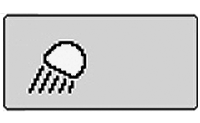
RXA0099744-UN-07NOV08
CommandCenter Main Menu
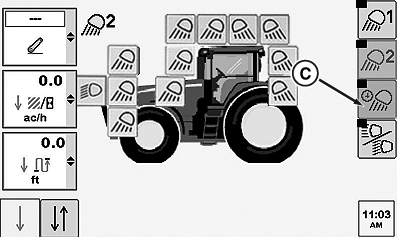
RXA0101480-UN-31MAR09
Lighting Page
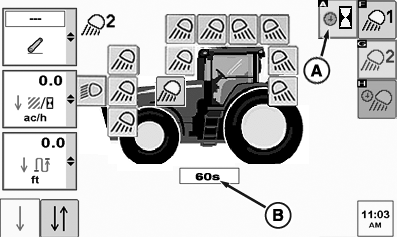
RXA0101479-UN-31MAR09
Egress Lighting Page
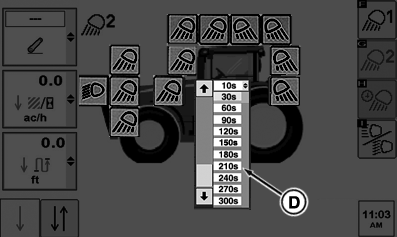
RXA0101481-UN-31MAR09
Drop Down Menu
A - Egress Delay Soft Key
B - Egress Delay Drop Down Box
C - Egress Soft Key
D - Egress Delay Time Selection
Select lights.
Select Egress soft key (C) for egress lighting.
Select Egress Delay soft key (A).
Select Egress Delay drop down box (B). When drop down box appears, make egress delay time selection (D) before lights will automatically turn off. This could be from 10 to 300 seconds in thirty second increments.
Programming Egress lighting is the same as field lighting with all clear-lens lights selectable. Only operator selected clear-lens lights will come ON when egress lighting is selected.
|
CommandCenter is a trademark of Deere & Company |
OURX935,0000CDE-19-20091217 |