Navigating The CommandCenter™—Read Me First
NOTE:
RXA0099737-UN-14JUL10
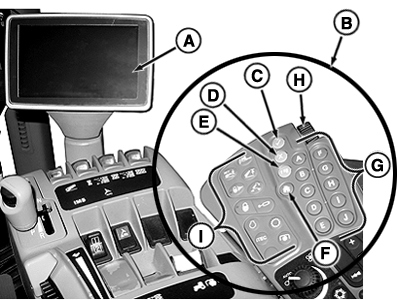
CommandARM™ With CommandARM Controls And CommandCenter
RXA0110755-UN-16SEP10
Softkeys
Viewing information on the CommandCenter™ is similar to viewing information in a book. As you page forward more information is presented. Likewise every display of new information is another page in the CommandCenter allowing operator to fine tune tractor functions.The CommandCenter (A) attached to CommandARM allows operator to view selected pages required to operate tractor.
There are three methods of navigating through CommandCenter pages:
- Rotate CommandARM Controls (B) thumb wheel (H) to a specific box or softkey (I) and press Confirm button (C) to direct tractor to perform a function. Press Cancel button (D) to void a command.
-
NOTE: Softkeys, ”A” through ”J”
(G) correlate to softkeys (I) on CommandCenter pages.
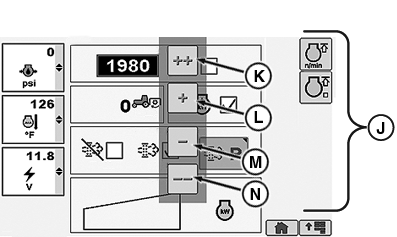
Use softkeys to quickly navigate through system to a page, then use thumb wheel to specific portion of a page. - For tractors equipped with TouchScreen CommandCenter, touch the softkeys, buttons or icons to make a selection. To adjust setting on bar graph, use increase or decrease value buttons. For input boxes, either use the keypad or select input box when highlighted and scroll thumb wheel to desired value.
There are a variety of input fields and buttons that allow the operator to navigate through pages to direct tractor functions.
Primary CommandARM Controls navigational tools listed below:
A — CommandCenter allows operator to monitor and receive immediate visual feed back on all monitored functions associated with tractor operations.
B — CommandARM Controls is a key pad made up of buttons, shortcut keys and softkeys allowing operator to manage tractor functions.
C — Confirm Button used to select highlighted item.
D — Cancel Button cancels or deselects action previously selected.
E — Menu Button returns operator to the CommandCenter Menu.
F — Home Button returns operator to home page.
G — Softkey Buttons activate softkeys.
H — Thumb Wheel allows operator to perform specific functions such as changing information in input boxes. Rotating thumb wheel forward raises input box values. Rotating thumb wheel rearward lowers input box values.
I –– Softkeys allows operator quick access to a specific page or curser placement on page.
J –– M Increase/Decrease Value Buttons For tractors equipped with Touch Screen, allows operator to make setting adjustments touching appropriate button. The ++ and - - allows operator to make larger incremental changes when adjusting than touching + or - buttons. For areas that require tighter adjustments, such as the rear hitch, only the + and - buttons are available.
|
CommandARM is a trademark of Deere & Company CommandCenter is a trademark of Deere & Company |
OURX935,000000B-19-20100921 |