Setting Implement Width and Control Modes
RXA0098156-UN-07NOV08
CommandARM™ Menu Button

RXA0106134-UN-15JUL10
Home → Performance Monitor Main Softkey
RXA0106317-UN-02AUG10
Performance Monitor Page
RXA0106414-UN-02AUG10
Area Counter Control Modes
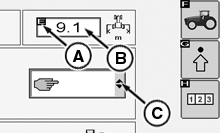
A - Implement Width Softkey
B - Implement Width Input Box
C - Area Counter Control Mode Drop Down Box
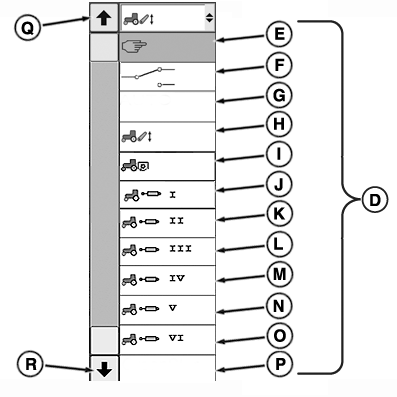
D - Area Counter Control Modes
E - Manual Mode
F - Switch Mode
G - Auto Mode
H - Hitch Mode
I - Rear PTO Mode
J - SCV I Mode
K - SCV II Mode
L - SCV III Mode
M - SCV IV Mode
N - SCV V Mode
O - SCV VI Mode
P - GreenStar ™
Q - Arrow Up
R - Arrow Down
S - Implement Status Indicator
-
Select Menu button.
-
Select Performance Monitor.
-
Select Performance Monitor Main softkey.
-
Select Implement Width softkey (A).
-
Width Input box (B) highlights. Enter implement width.
-
Select Confirm button.
NOTE: If Area Counter Control manual mode (E) is selected, implement status indicator (S) can be changed.
-
Area Counter Control Modes are changed by selecting Area Counter Control Mode Drop Down box, make mode selection.
|
CommandARM is a trademark of Deere & Company GreenStar is a trademark of Deere & Company |
OURX935,0000021-19-20100811 |