Calibrating Dual Beam Radar
RXA0098156-UN-07NOV08
CommandCenter™ Menu Button
RXA0110753-UN-20SEP10
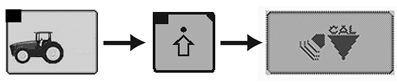
Performance Monitor → Performance Monitor Settings → Calibrate Radar
RXA0106591-UN-02AUG10
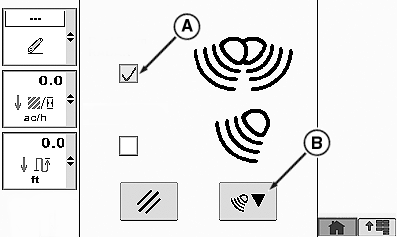
Calibrate Radar Page
A - Dual Beam Radar Check Box
B - Calibration Box
-
Select Menu button.
-
Select Performance Monitor.
-
Select Performance Monitor Settings softkey.
-
At the bottom of the Performance Monitor Settings page, select Calibrate Radar button.
-
Place check in Dual Beam Radar check box (A).
-
Select calibration Box (B).
|
CommandCenter is a trademark of Deere & Company |
OURX935,0000029-19-20100921 |