Draining IVT™/AutoPowr™ Transmission And Cleaning Transmission Filter
-
Remove four cap screws (A) and cover (B).
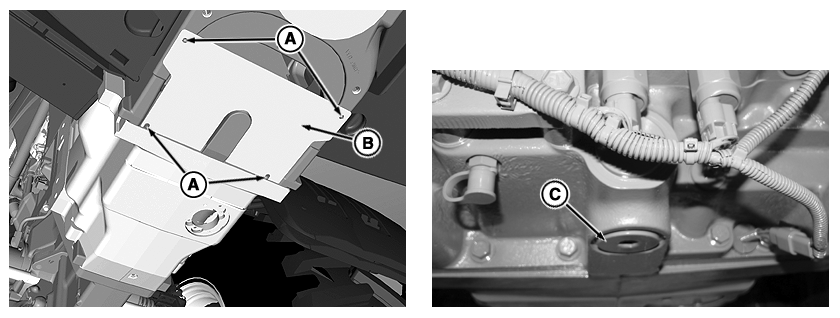
RXA0110093-UN-26AUG10Remove IVT™/AutoPowr™ Transmission Cover, Drain Plug and Drain Transmission
A - Cap Screws
B - Cover
C - Drain Plug
-
Place drain pan under transmission drain plug.
-
Remove drain plug (C).
-
Retain drain plug for reinstallation.
-
Using a work light, inspect the filter through the bottom drain plug opening.
-
If the filter screen appears clean, reinstall plug, and dispose of oil in accordance with local laws and ordinances.
If screen appears dirty, remove screen as described below.
IMPORTANT: Do not remove screen unless it is dirty. Refer to your John Deere™ dealer with any question you have on removing hydro control valve and/or transmission filter screen.
When working with hydraulic components, cleanliness is essential and ANY FOREIGN MATERIAL (DIRT) can damage equipment! Clean area around the hydro control valve thoroughly with steam cleaner prior to removing it, then make sure valve is clean before installing it.
IMPORTANT: Make sure wiring harness is disconnected and kept out of the way of any dripping oil before removing screen access plug. Oil in wiring harness connectors will damage equipment.
-
Remove connectors (A) on control valves then tuck wiring harness (B) out of the way.
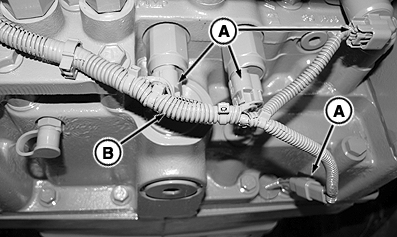
RXA0083068-UN-03AUG05Remove Connectors
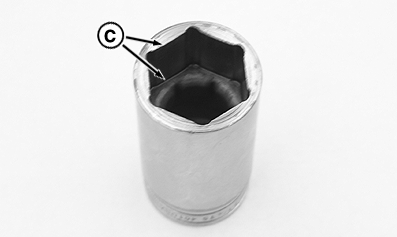
RXA0083064-UN-03AUG051 1/4 in. Deep Well Deep Broach Socket
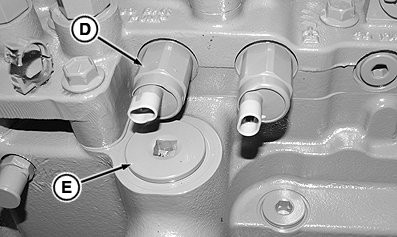
RXA0083072-UN-03AUG05Remove Plug
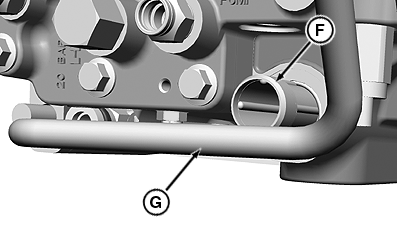
RXA0086863-UN-21FEB06A - Connectors
B - Wiring harness
C - Deep Well Deep Broach Socket
D - Hydro Control Valve
E - Screen Access Plug
F - Screen
G - Independent Link Suspension Tube
IMPORTANT: Removing hydro control valve requires a 1 1/4 in. (deep broach) deep well socket (C) to avoid damaging control valve.
-
Remove hydro control valve (D).
NOTE: For tractors with Independent Link Suspension, remove screen carefully avoiding Independent Link Suspension tube (G).
-
Remove screen access plug (E) at front of transmission, then remove screen (F).
-
Remove filter screen and wash carefully in solvent. Blow dry with compressed air before reinstalling screen.
-
Install screen in transmission, front screen plug, and bottom drain plug.
-
Reinstall control valve and wiring harness connectors.
-
Reinstall drain plug.
-
Dispose of used oil in accordance with local laws and ordinances.
-
For tractors equipped with Independent Link Suspension, proceed to Draining Independent Link Suspension (If Equipped).
For tractors not equipped with Independent Link Suspension, proceed to Cleaning Hydraulic Oil Suction Screen in this section.
|
John Deere is a trademark of Deere & Company |
OURX935,000004C-19-20100920 |