Operating Premium Radio Through CommandARM™ Controls
RXA0097745-UN-21APR08
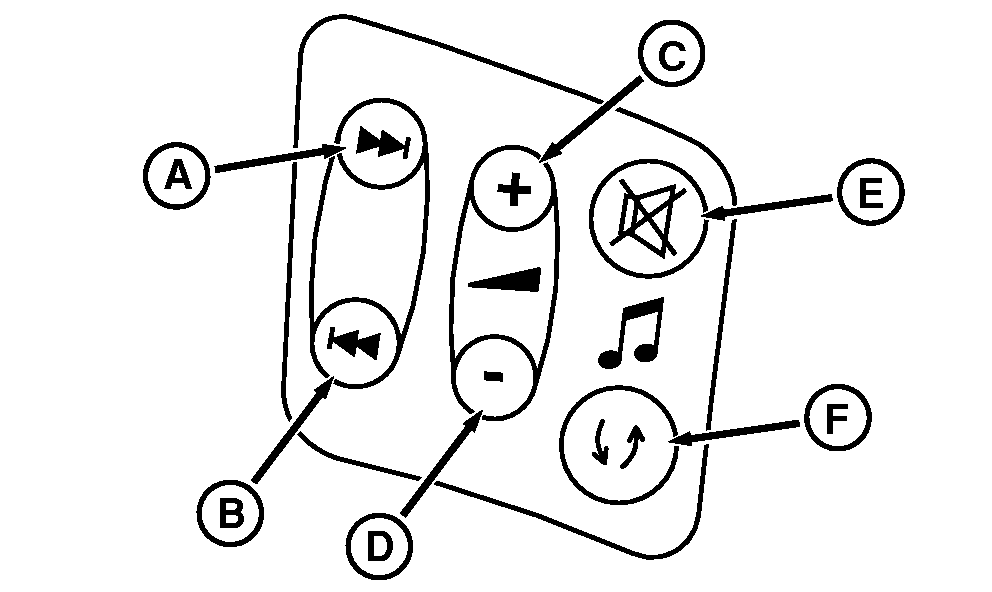
Radio Adjustment Buttons On CommandArm
RXA0106081-UN-04AUG10
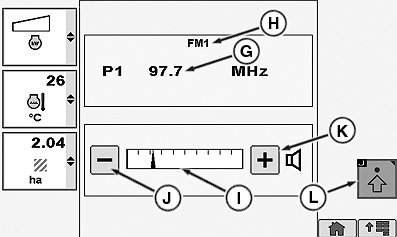
Audio Page
RXA0106083-UN-20AUG10
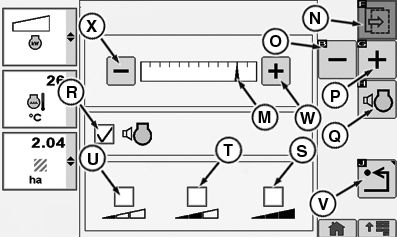
Audio Settings Page
A - Radio Preset/Track Increase
B - Radio Preset/Track Decrease
C - Radio Volume Increase
D - Radio Volume Decrease
E - Radio Mute
F - Radio Source (AM/FM/WB/CD/Aux)
G - Frequency Input Box
H - Radio Source Indicator
I - Volume Bar Graph Indicator (Audio Page)
J - Decrease Button
K - Increase Button
L - Advanced Settings Softkey
M - Volume Bar Graph Indicator (Audio Settings Page)
N - Next Key
O - Decrease Softkey
P - Increase Softkey
Q - Volume Compensation Softkey
R - Volume Compensation Box
S - High Volume Sensitivity Check Box
T - Medium Volume Sensitivity Check Box
U - Low Volume Sensitivity Check Box
V - Back Softkey
W - Increase Button
X - Decrease Button
Press Radio Preset/Track Increase button (A) to go to next higher preset radio station frequency or press Radio Preset/Track Decrease button (B) to go to next lower preset radio station frequency. When frequency selection is made it will display in CommandCenter™ frequency input box (G).As Volume Increase or Decrease buttons (C or D) are pressed, the Volume Bar Graph Indicator (I) will move respectively to the right as volume increases or to the left as volume decreases.
Press Advanced Settings softkey (L) to access Audio Settings page and the following settings:
- Bass
- Middle
- Treble
- Fade
- Balance
- Eq—Manual
NOTE: For tractors equipped with Touch Screen, touching either decrease (O or X) decreases volume. For tractors equipped with Touch Screen, touching either increase (P or W) increases volume.
Pressing Next softkey (N) scrolls through each of the above settings. Pressing Increase (P) or Decrease (O) adjusts the Volume.
Pressing Back Softkey (V) returns to previous page.
Selecting high (S), medium (T) or low (U) Volume Sensitivity check box reflects how rapidly volume reacts to adjustments.
Press Volume Compensation softkey (Q) to highlight Volume Compensator check box (R). Place check in box to activate Volume Compensation with engine rpm increase or decrease.
|
CommandARM is a trademark of Deere & Company CommandCenter is a trademark of Deere & Company |
OURX935,0000FAE-19-20100310 |