Adjusting Hitch Raise Rate
IMPORTANT: Excessive raise speed may cause injury or machine damage. Fully raising implement should take at least two seconds.
-
At the CommandCenter™ Main Menu select Hitch icon.
Press raise rate softkey (A).

RXA0110774-UN-09SEP10CommandCenter™ Main Menu → Hitch
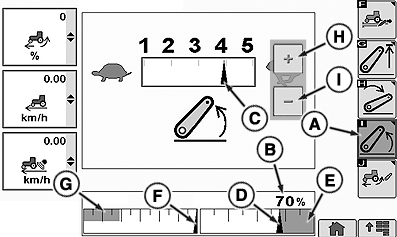
RXA0107189-UN-02AUG10A - Hitch Raise Rate Softkey
B - Hitch Position Value
C - Hitch Response Indicator
D - Position Indicator
E - Upper Set Limit
F - Commanded Depth Indicator
G - Stored Depth Indicator
H - Touch Screen Increase Value (If Equipped)
I - Touch Screen Decrease Value (If Equipped)
-
Observe display. Raise rate setting is indicated by Hitch Response Indicator (C).
NOTE: Changes to raise rate take place immediately.
|
CommandCenter is a trademark of Deere & Company |
OURX935,000105B-19-20100421 |