Track Adjustment
RXA0100722-UN-19FEB09
RXA0099664-UN-31OCT08
RXA0099679-UN-31OCT08
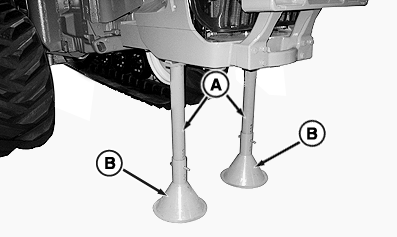
A - JDG1566 Front Supports
B - JDG1076 Cone Stand Base
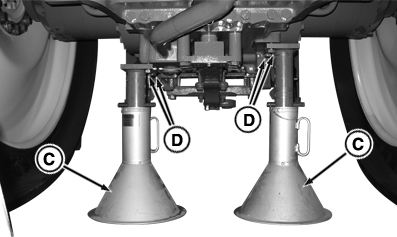
C - JT07211 Rear Support Stands
D - Cap Screws
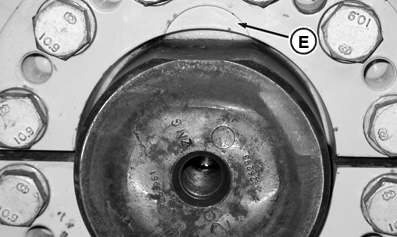
E - Rear Axle Sleeve Recess
See DRIVE WHEEL AND WALKING BEAM SETTINGS in for tread setting table, in this section of Operator’s Manual.
NOTE: It is not necessary to detention track belts before performing tread adjustments.
Surfaces between walking beam and track frame must be clean of debris when adjusting tread settings.
Park tractor on firm level surface rotating tractor drive wheels until rear axle sleeve recess’s (E) are straight up in the 12 O clock position. This will place wheel sleeve flanges in correct position.
Keeping tractor level front and back, raise entire tractor until approximately 76 mm (3 in.) clearance exist between belt tread and ground.
 CAUTION: Avoid possible personal injury. Ensure that tractor is fully supported and stable using support stands with sufficient capacity before removing or adjusting tread settings.
Install JDG1566 Front Supports (A) with cones from JDG1076 Cone Stand Base (B) to front frame support.
Install JT07211 Rear Support Stands (C) to differential case with cap screws (D).
Disconnect track tension pressure sensor harness connector (B).
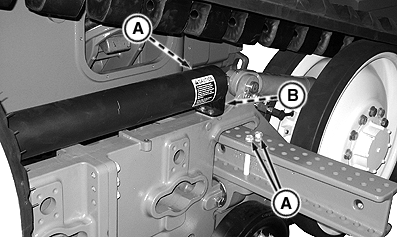
RXA0099538-UN-24FEB09Disconnect Pressure Sensor Harness Connector And Remove Walking Beam Cap Screws.
A - Cap Screws
B - Pressure Sensor Harness Connector
Remove two inner (A) and two outer (A) M20 walking beam cap screws.
Remove eight rear wheel cap screws (D).
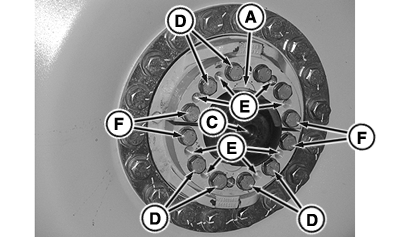
RXA0099693-UN-03NOV08Remove Cap Screws And Install walking Beam Cap Screws In Jacking Holes
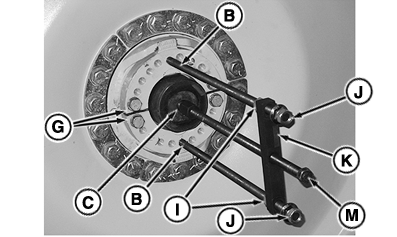
RXA0099603-UN-12DEC08Install JDG10929 Track Adjustment Tool
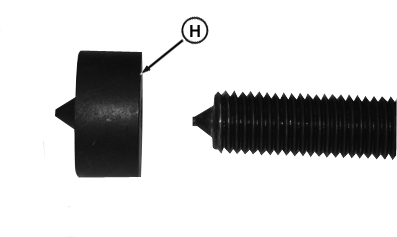
RXA0099582-UN-24OCT08Adapter—Used To Move Track In
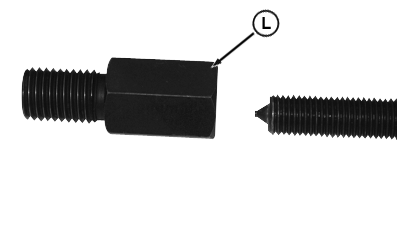
RXA0099584-UN-24OCT08Step Plate—Used To Move Track Out
A - Drive Wheel Sleeve Recess
B - Leg Of Tool
C - Axle Hole
D - Cap Screws
E - Jacking Holes
F - Cap Screws
G - Edges Of Wheel Sleeves
H - Adapter
I - Inner Nuts
J - Outer Nuts
K - Cross Member
L - Step Plate
M - Center Cap Screw
IMPORTANT: The four cap screws (F) must be left in place to ensure the edges of wheel sleeves (G) remain flush.
Loosen, but do not remove cap screws (F).
NOTE: Because walking beam cap screws are longer than drive wheel cap screws, as they are tightened, they push axle sleeves from drive wheel.
An audible “pop” noise will be heard as wheel hub sleeves release and gap will be noticeable as sleeves release.
Install the four previously removed walking beam cap screws, two in each sleeve half, in sleeve jacking holes (E) and tighten as required to loosen wheel sleeves.
IMPORTANT: JDG10929 Track Adjustment Tool must be installed in holes (B) and hole at the end of axle (C).
To slide drive wheel in follow steps 11 through 15, then proceed with step 22.
To slide drive wheel out, skip to step 16 before proceeding through procedure.
When sleeves are loosened, remove cap screws (F).
Install JDG10929 Track Adjustment Tool in cap screw holes (B).
Hold adapter (H) to center cap screw while tightening center cap screw so that adapter is held in place at rear axle hole (C).
Tighten inner and outer nuts to JDG10929 Track Adjustment Tool cross member (K).
Tighten center cap screw (M) pulling wheel to desired position.
Install JDG10929 Track Adjustment Tool in cap screw holes (B), then install step plate (L) to center cap screw.
Install opposite end into rear axle shaft hole (C).
Tighten inner nuts against JDG10929 Track Adjustment Tool cross member, snug outer nuts against cross member.
Alternate tightening each JDG10929 Track Adjustment Tool inner cap screw two turns at a time. Make sure outer cap screws remain even.
RXA0099537-UN-13OCT08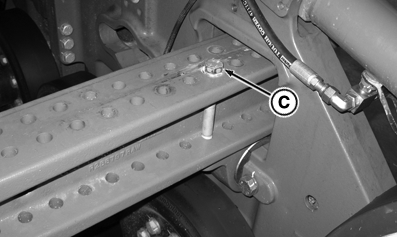
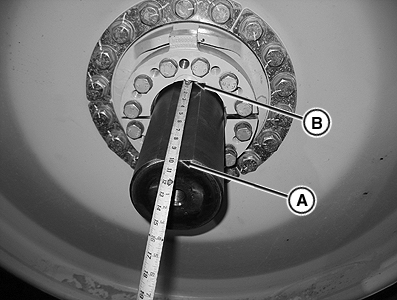
RXA0099677-UN-31OCT08A - End Of Axle
B - Drive Wheel Sleeve Recess
C - Walking Beam Cap Screw
Measure distance from rear axle sleeve recess to end of drive axle.
Using track adjustment tool JDG10929 as previously described, position drive wheel in or out to reach required tread setting.
Install drive wheel cap screws in original drive wheel holes. Tighten, but do not torque cap screws.
Using the table in Drive Wheel And Walking Beam Settings, make sure holes in walking beam are correctly aligned to achieve required tread setting.
Install one inner walking beam cap screw (C) and leave loose.
Before tightening drive wheel cap screws, place tape measure against drive wheel sleeve access (B) and re-measure distance to end of axle (A).
After tread setting has been verified, using a crisscross pattern, tighten Drive Wheel Cap Screws to initial torque specification.
Item Measurement Specification Drive Wheel Cap Screws Initial Torque 330 N•m (245 lb-ft) Install remaining three walking beam cap screws and using a crisscross pattern, tighten to torque specification.
Item Measurement Specification Walking Beam Cap Screws Torque 430 Nm (320 lb-ft) Make sure distance from drive wheel half moon cut out to end of axle has not changed.
Using a crisscross pattern, tighten Drive Wheel Cap Screws to torque specification.
Item Measurement Specification Drive Wheel Cap Screws Torque 430 N•m (320 lb-ft) Using a crisscross pattern, tighten Drive Wheel Cap Screws to torque specification again.
Item Measurement Specification Drive Wheel Cap Screws Torque 430 N•m (320 lb-ft) Raise tractor and remove jack stands, lower tractor to ground and remove lifting jacks.
Install track pressure sensor wiring connector.
Drive track approximately 50 Meters (150 ft.)
Using a crisscross pattern, tighten Drive Wheel Cap Screws until all cap screws maintain torque specification.
Item Measurement Specification Drive Wheel Cap Screws Torque 430 N•m (320 lb-ft) Drive wheels cap screws should be retightened to torque;
- after 3 hours
- after 10 hours
- Daily during next week of operation
- after SIGNIFICANT CHANGE IN OPERATION such as changing from disks to ripper.
OURX935,00008B5-19-20090617 |