Calibrating Dual Beam Radar
RXA0098156-UN-07NOV08
CommandCenter™ Menu Button
RXA0110753-UN-20SEP10
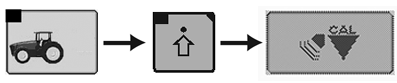
Performance Monitor → Performance Monitor Settings → Calibrate Radar
RXA0106591-UN-02AUG10
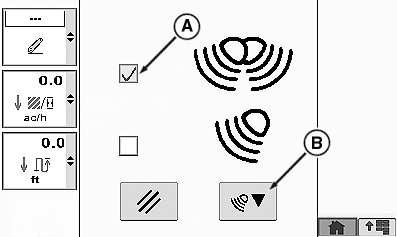
Calibrate Radar Page
A - Dual Beam Radar Check Box
B - Calibration Box
Select Menu button.
Select Performance Monitor.
Select Performance Monitor Settings softkey.
At the bottom of the Performance Monitor Settings page, select Calibrate Radar button.
Place check in Dual Beam Radar check box (A).
Select calibration Box (B).
CommandCenter is a trademark of Deere & Company | OURX935,0000029-19-20100921 |