Operating Tractor Implement Automation
Connect TIA equipment to tractor via ISO connection.
RXA0098156-UN-07NOV08Main Menu

RXA0107900-UN-02AUG10TIA Icon

RXA0109713-UN-18AUG10TIA Softkey
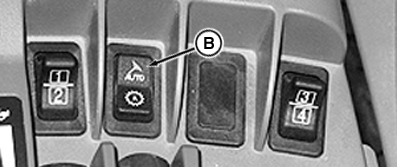
RXA0110017-UN-14SEP10AutoTrac Switch
A - TIA Softkey
B - AutoTrac Switch
Select Main Menu button.
NOTE: See Configuring Home Page to display TIA softkey on Tractor-Implement Automation Activation page.
At CommandCenter™ main menu, Select TIA Icon.
Select either TIA softkey (A) or AutoTrac™ switch (B).
Unknown Implement # previously displayed in Tractor-Implement Automation Activation page component list changes to the specific Implement name.
Follow implement Operator’s Manual instructions to operate implement.
CommandCenter is a trademark of Deere & Company AutoTrac is a trademark of Deere & Company | OURX935,0000089-19-20100921 |