Entering Or Editing Equipment Name
Select iTEC
RXA0098156-UN-07NOV08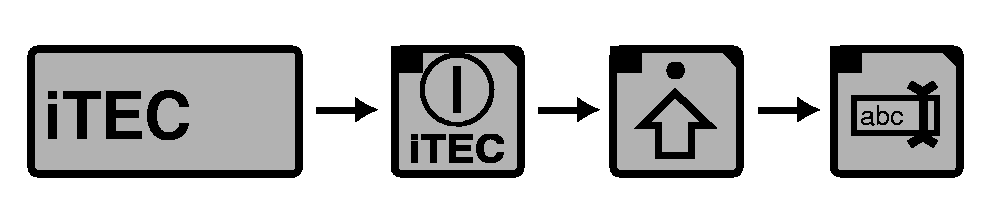
RXA0104067-UN-29JUL10iTEC→ iTEC On/Off→Advanced Settings→Edit Implement Name
RXA0106095-UN-27JUL10Editing Page
SelectiTEC ON/OFF softkey.
Select Advanced Settings softkey.
Select Edit Implement Name softkey.
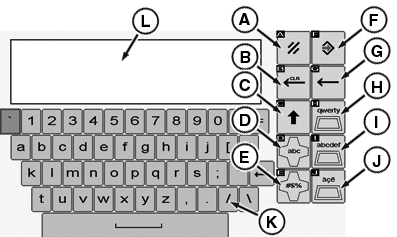
At the editing page:
- A—Cancel Softkey allows operator to exit without making changes.
- B—Clear Editing Box softkey clears editing box.
- C—Toggles between upper and lower case editing keys.
- D—Alpha/Numeric Character softkey changes special characters keypad into alpha/numeric keypad option.
- E—Special Character softkey changes alphabet keypad into special characters keypad option.
- F—Save/Enter softkey allows operator to enter data to operating page after entry is made in editing box.
- G—Back Space softkey moves editing box curser back one space.
- H—Standard English Keyboard softkey allows operator to choose standard English Keyboard.
- I—ABC-Keyboard softkey allows operator to choose keyboard with alpha/numeric characters in alphabetical order.
- J—Numbers/Symbols softkey allows operator to input implement name in numbers or symbols.
- K—Keyboard.
- L—Editing Box.
CommandCenter is a trademark of Deere & Company | OURX935,0001247-19-20100921 |