CommandCenter™ Page Layout
NOTE:
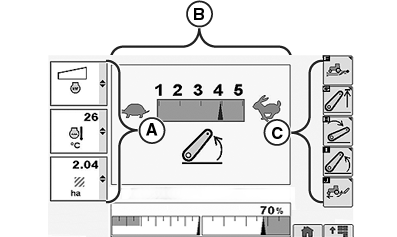
RXA0107697-UN-14JUL10
Example of Page Layout
A - Left Region
B - Center Region
C - Right Region
Displayed page shown is reference only. Actual pages may appear differently due to connection of optional devices and tractor configuration.Left Region (A), Center Region (B) and Right Region (C) selections will be active on most pages.
- A — Left Region: allows operator to choose and monitor three boxes at a time. Each box displays an ongoing function or specific tractor status.
- B — Center Region: allows operator to view and change tractor settings in a wide variety of applications.
- C — Right Region: displays softkey options available to the operator from current page.
Selecting a right region softkey displays a new page, function, or allows changing settings.
Left Region boxes are displayed in a strip of three individual boxes that can be monitored while allowing operator to focus on specific functions active in page center region.
ZE59858,0000394-19-20110221 |