Service Interval
RXA0098156-UN-07NOV08
CommandARM™ Menu Button

RXA0106134-UN-15JUL10
Performance Monitor → Settings
RXA0112577-UN-22DEC10
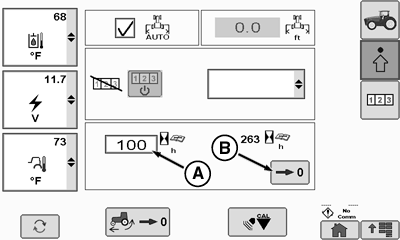
Performance Monitor Settings Page
RXA0112579-UN-22DEC10
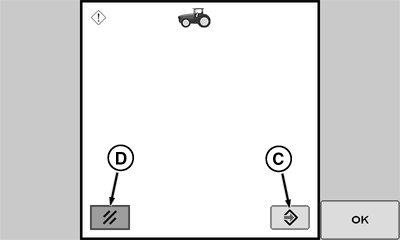
Reset Hours Since Service Page
A - Service Interval Box
B - Reset Hours Softkey
C - Reset Hours Since Service Softkey
D - Cancel
Service Interval: Alarm interval is adjustable between 0 and 1000 hours, in 10-hour increments. When hours of operation reach setting, service alarm will sound with a corresponding message appearing on CommandCenter™.
After service is performed, Hours Since Service display should be reset to zero.
Select Menu button.
Select Performance Monitor.
Select Settings softkey.
At Performance Monitor page select Service Interval box (A).
Adjust service interval 1.
Make selection when desired entry is displayed.
Select Reset Hours softkey (B).
Select Reset Hours Since Service softkey (C) to reset time.
CommandARM is a trademark of Deere & Company CommandCenter is a trademark of Deere & Company 1 If using thumb wheel, rotate thumb wheel forward to increase or rearward to decrease hour setting displayed. | ZE59858,00003A2-19-20101220 |