Setting Implement Width and Control Modes
RXA0098156-UN-07NOV08
CommandARM™ Menu Button

RXA0106134-UN-15JUL10
Home → Performance Monitor → Settings
RXA0112580-UN-22DEC10
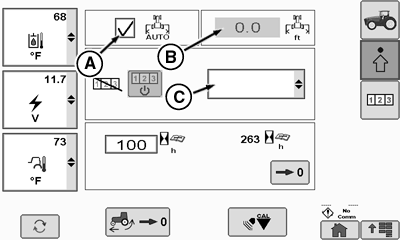
Performance Monitor Page
RXA0112582-UN-14FEB11
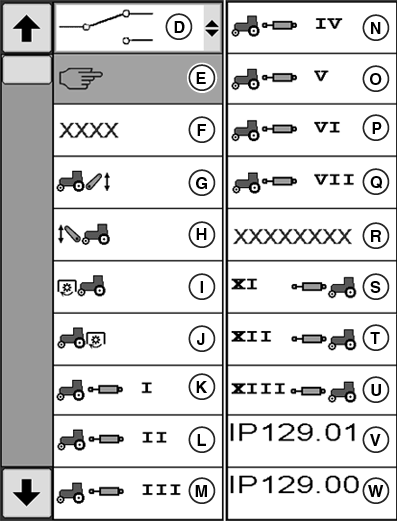
Area Counter Control Modes
A - Automatic Implement Width Box
B - Implement Working Width Box
C - Area Counter Control Mode Drop Down Box
D - Switch Mode
E - Manual Mode
F - AUTO Mode
G - Hitch Control Unit Mode
H - Front Hitch Control Unit Mode
I - Front PTO Mode
J - Rear PTO Mode
K - SCV I Mode
L - SCV II Mode
M - SCV III Mode
N - SCV IV Mode
O - SCV V Mode
P - SCV VI Mode
Q - SCV VII Mode
R - GreenStar™
S - Front SCV XI
T - Front SCV XII
U - Front SCV XII
V - Implement Status Indicator (IP129.01)
W - Implement Status Indicator (IP129.00)
Select Menu button.
Select Performance Monitor.
Select Settings softkey.
Select Implement Working Width softkey (B). When input box highlights, enter implement width.
Select Confirm button.
NOTE: If area counter control Manual Mode (E) is selected, Implement Status Indicator (V, W) can be changed.
Area counter control modes are changed by selecting Area Counter Control Mode drop down box (C), make mode selection.
CommandARM is a trademark of Deere & Company GreenStar is a trademark of Deere & Company | ZE59858,00003A6-19-20101220 |