Manual Vehicle Speed Calibration
RXA0098156-UN-07NOV08
CommandCenter™ Menu Button
RXA0110753-UN-20SEP10
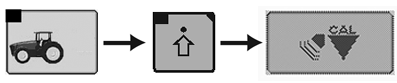
CommandARM™ Menu Button →Performance Monitor → Performance Monitor Settings → Calibrate Radar
RXA0106592-UN-02AUG10
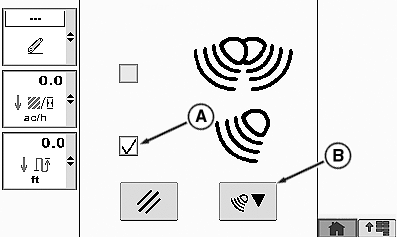
Calibration Box
A - Other Radar Check Box
B - Calibration Box
NOTE: The Vehicle Speed Calibration (Manual) procedure is not to be used with John Deere ™ Dual Beam Radar.
Automatic vehicle calibration is used with John Deere™ Dual Beam radar or GPS signal device. See Vehicle Speed Calibration (Automatic) in this section.
On tractors equipped with no radar or single beam radar, a change in tire size or loading of tractor can affect wheel and ground speed which requires recalibration.
On a hard level dry surface, mark out a 400 ft. (122 m) course. Place easily visible markers at the start and end of the course.
Drive tractor up to, but do not cross, course start line.
Select Menu button.
Select Performance Monitor.
Select Performance Monitor Settings softkey.
At the bottom of the Performance Monitor Settings page, select Calibrate Radar button.
Select ”Other RADAR” which will automatically place check in check box (A).
Select calibration Box (B) and begin down course.
Calibration results will display.
Calibration Results
If Calibration is Successful
If Calibration is Unsuccessful
Calibration
SuccessfulCalibration
UnsuccessfulIf failed message is received, perform procedure again.
NOTE: If after three attempts vehicle speed calibration is unsuccessful, see your John Deere™ dealer.
CommandCenter is a trademark of Deere & Company CommandARM is a trademark of Deere & Company John Deere is a trademark of Deere & Company | ZE59858,00003AF-19-20101220 |