Highlight Color
RXA0098156-UN-07NOV08
CommandARM™ Menu Button

RXA0103916-UN-14JUL10
Display → Advanced Settings Softkey → Highlight Softkey
RXA0105975-UN-14JUL10
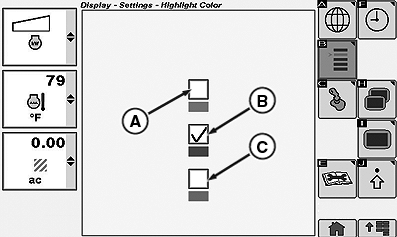
Display Setting Highlight Color Page
A - Green
B - Blue
C - Red
Select Menu button.
Select Display.
Select Advanced Settings softkey.
Select Highlight softkey.
At Display Setting Highlight Color page, set highlight to green (A), blue (B), or red (C) by placing check in the appropriate check box.
CommandARM is a trademark of Deere & Company | ZE59858,00003B1-19-20101220 |