Using FieldCruise™
IMPORTANT: Engine must be running for FieldCruise™ adjustment to operate.
RXA0099745-UN-07NOV08
Engine
RXA0113335-UN-27JAN11
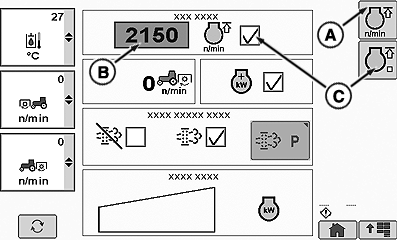
Engine Page
A - FieldCruise™ Settings Softkey
B - RPM Input Box
C - FieldCruise™ On/Off
Engine speed can be adjusted from 1050 to 2100 rpm. Changes to rpm setting take place immediately.
FieldCruise™ utilizes a constant speed governor curve, providing instant response to varying loads.
Limiting engine speed in light load situations may improve fuel economy.
IVT™/AutoPowr™: Selecting appropriate CommandCenter™ IVT™/AutoPowr™ setting is the preferred method of controlling engine rpm, but FieldCruise™ can be considered for certain applications such as PTO operation when baling.
To Activate FieldCruise™:
Select Engine.
NOTE: When FieldCruise™ On/Off softkey (C) is selected, it toggles FieldCruise™ on or off and displays check box (C) either checked for FieldCruise™ ON or unchecked for FieldCruise™ OFF.
When engine page appears, select FieldCruise™ On/Off softkey (C).
To Adjust Engine rpm:
Select FieldCruise™ Settings softkey (A).
At rpm input box (B) select desired rpm, rotate thumb wheel forward to increase engine rpm or rearward to decrease engine rpm.
AutoPowr is a trademark of Deere & Company CommandCenter is a trademark of Deere & Company | ZE59858,00003F8-19-20110221 |