Cab Suspension (If Equipped)
RXA0112553-UN-27JAN11
CommandCenter™ Menu Engine Icon
RXA0112551-UN-11FEB11
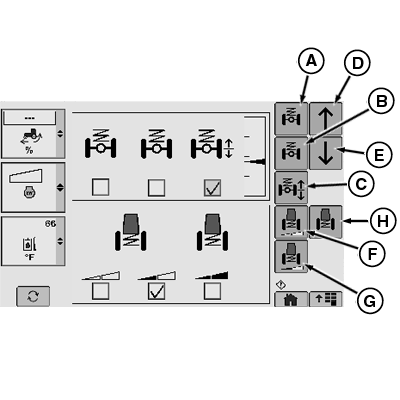
Suspension Page
A - Front Suspension Auto Button
B - Front Suspension MAX Button
C - Front Suspension Manual Button
D - Increase
E - Decrease
F - Cab Suspension Auto Soft Button
G - Cab Suspension Auto Medium Button
H - Cab Suspension MAX Button
Front axle suspension can be set for three different firmness levels: Auto (A), MAX (B), and Manual (C).
When Manual (C) is selected, the operator is able to select the desired firmness by changing it with the Increase (D) and Decrease (E) buttons.
Cab suspension can be set for three different firmness levels: Auto Soft (F), Auto Medium (G), and Max (H).
Auto Soft (F) enables the cab suspension to operate from 0%—100% stiffness. Auto mode will provide the best suspension for transport situations. The cab will move the most in the Auto Soft mode (F). If less cab movement is desired select a stiffer setting.
Auto Medium (G) enables the cab suspension to operate from 50%—100% stiffness. Auto Medium (G) is most suitable for field operation.
Max (H) enables the cab suspension to always operate at 100% stiffness. The Max setting is most suitable for loader operations or operations that require frequent shuttle shifting.
NOTE: Cab suspension should never hit end stops. If this occurs, select a stiffer setting.
CommandCenter is a trademark of Deere & Company | ZE59858,00003FA-19-20110119 |