Operating the Transmission
RXA0112141-UN-07JAN11
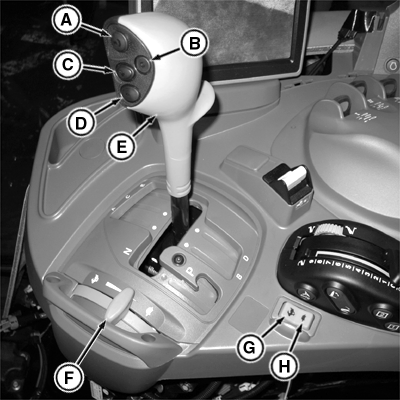
AutoQuad™ PLUS Shown (PowrQuad™ PLUS Similar)
RXA0112240-UN-07JAN11
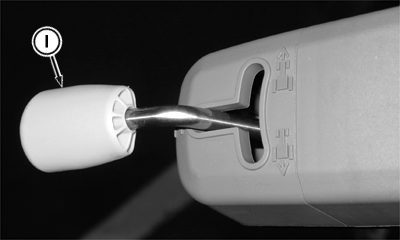
Left-Hand Reverser
A - Hand Declutch Button
B - Enable/Resume Button (AutoQuad™ PLUS Only)
C - Upshift Button (Range Lever)
D - Downshift Button (Range Lever)
E - Range Lever
F - Hand Throttle
G - Upshift Button (Console)
H - Downshift Button (Console)
I - Left-Hand Reverser Lever
 CAUTION: Avoid personal injury or damage to tractor. If engine starts with left-hand reverser lever in forward or reverse positions, there is a malfunction in the starting circuit. Repairs should be made immediately by your John Deere™ dealer.
IMPORTANT: Prevent transmission or clutch damage:
- Never depress clutch pedal or hand declutch button (A) while tractor is rolling downhill or coasting, as serious transmission damage may result
- Never attempt to start tractor by towing or pushing
- Stop tractor completely before shifting to PARK position
- Avoid excessive ballast
- PowrQuad™ PLUS Only: Avoid continuous operation under full throttle and full load conditions below 1800 rpm
- Clutch pedal or hand declutch button (A) must be fully depressed to disengage clutch. Never rest foot on clutch pedal while tractor is moving.
Starting: Move range lever (E) to PARK position. Move left-hand reverser lever (I) to neutral position. Start engine.
Stopping: Depress clutch or hand declutch button (A) and brake pedals until tractor motion stops. Move left-hand reverser lever (I) to NEUTRAL position and range shift lever to PARK position. Slowly release brakes and stop engine.
Shifting transmission: Depress clutch or hand declutch button (A) and brake pedals. Move range lever (E) from the PARK position to one of the range positions (Clutch pedal or hand declutch button must be depressed when shifting from one range to another). Move the left-hand reverser lever (I) from the Neutral position into Forward or Reverse position. Manually select a gear using the gearshift button (C, D) on the range lever or on the console (G, H). Depress the rabbit button position (G) to increase the gear or the turtle button position (H) to reduce the gear. Gear changes can be made without depressing the clutch.
The corner post monitor will display the left-hand lever position (N, F, or R) and the selected gear (1-4).
Refer to Ground Speeds in Specifications section for Range/Gear Settings.
NOTE: When the engine shuts off, the left-hand reverser remains in its selected position but the transmission shifts into neutral. To start the engine, first put the left-hand reverser in neutral and range lever in park.
NOTE: The hand declutch feature is not suitable for ”creeping” up to connect to an implement.
Hand Declutch:
Press hand declutch button (A) to disengage clutch; the ranges may be selected or tractor can be stopped. Release hand declutch button (A) and clutch will engage by modulating on.
On tractors equipped with an operator presence switch, remain in the seat when using the hand declutch feature. The clutch will not reengage if the operator leaves the seat when using this feature, even though the reverser lever is in the forward or reverse position. A message will appear on the CommandCenter™. To make the tractor move, move the left-hand reverser lever to neutral and then back into desired direction.
Automatic Gear Shift (AutoQuad™ PLUS Only)
RXA0112260-UN-10DEC10
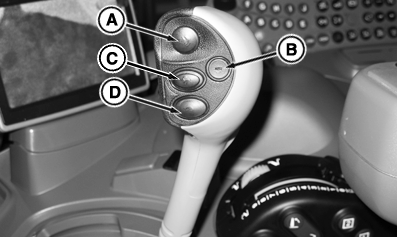
Range Shift Lever
RXA0111055-UN-15OCT10
A - Hand Declutch Button
B - Enable/Resume Button (AutoQuad™ PLUS Only)
C - Upshift Button
D - Downshift Button
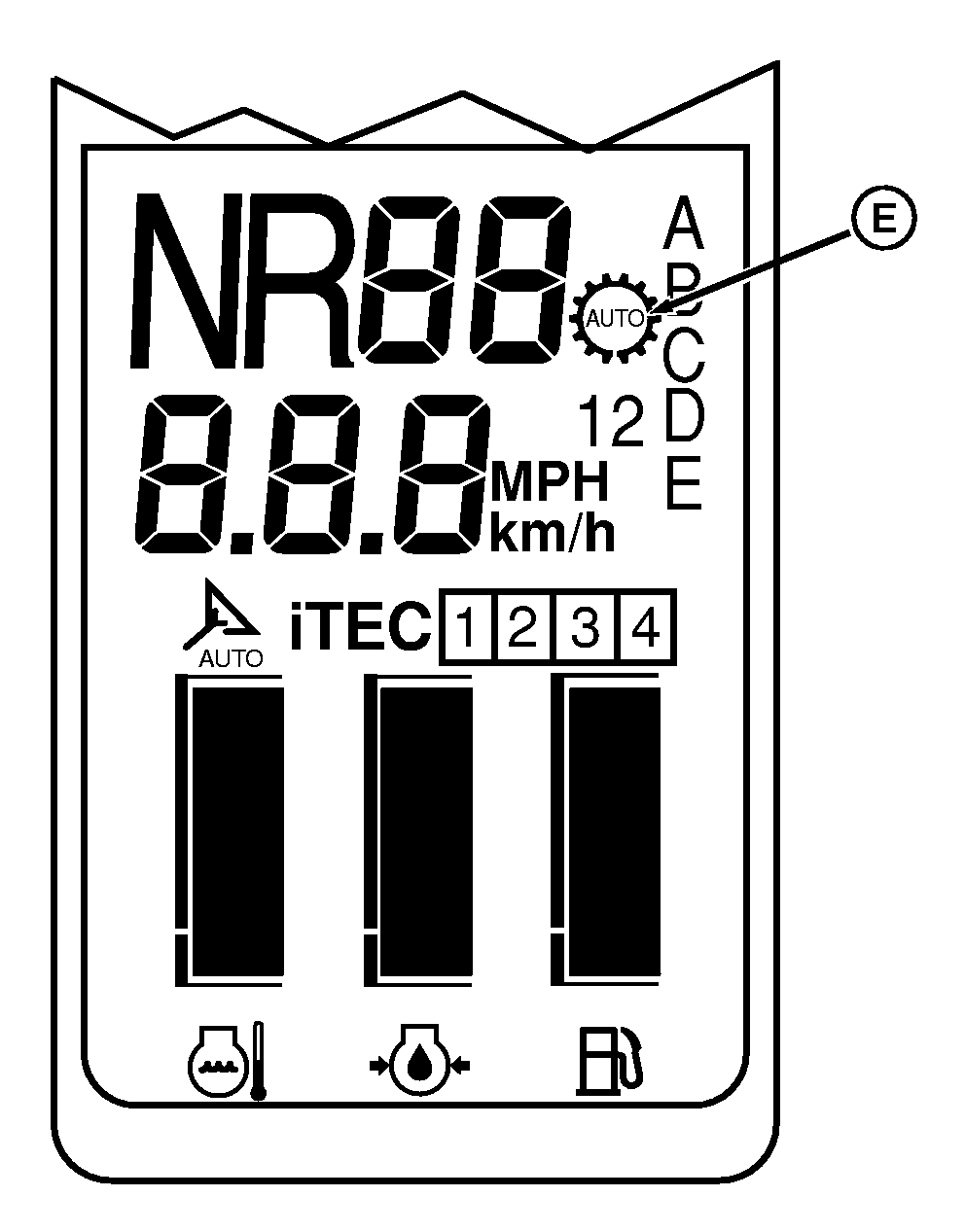
E - Automatic Shifting Indicator
Enable/Resume button (B) is used to turn automatic shifting on and off and to set maximum forward gear. When enabled, engine speed and throttle position are sensed. This allows gear shifting within the selected range to be performed automatically.
Any manual gear shifting cancels automatic shifting. Press enable/resume button (B) to restore automatic shifting; automatic shifting indicator (E) will light.
Depressing the clutch pedal, hand declutch button (A), or moving left-hand reverser lever into Neutral, suspends automatic shifting but does not cancel it. Automatic shifting will resume when clutch pedal or hand declutch button (A) is released or the left-hand reverser lever is placed into forward or reverse direction.
Automatic shifting will also function in reverse.
Automatic shifting is canceled when:
• Operator makes a manual speed change
• Operator presses enable/resume button (B) after automatic shifting is engaged
John Deere is a trademark of Deere & Company CommandCenter is a trademark of Deere & Company AutoQuad is a trademark of Deere & Company | ZE59858,0000402-19-20110214 |