CommandQuad™ Custom Settings
NOTE: All settings pertaining to this page are only applicable when CommandQuad™ transmission is in Custom Mode.

RXA0110751-UN-20SEP10
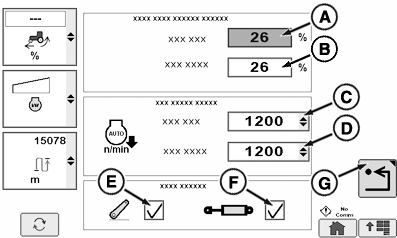
Transmission → Custom Settings Page
RXA0112381-UN-10DEC10
A - Auto Shift Engine Speed Droop PTO ON
B - Auto Shift Engine Speed Droop PTO OFF
C - ECO Engine Speed PTO On
D - ECO Engine Speed PTO Off
E - Load Anticipation (Hitch)
F - Load Anticipation (SCV)
G - Return
The Auto Shift Engine Speed Droop (A, B) sets the permissible drop in engine speed (under full load) before the Custom Mode will automatically downshift. A lower percent means that the transmission downshifts earlier and a higher percent means that the transmission downshifts later.
Under light loads, fuel can be saved by shifting up and throttling back. Auto mode does this automatically. While shifting up, however, the system will not reduce the engine speed below the ECO Engine Speed (C, D) set by the operator.
The Load Anticipation feature allows the CommandQuad™ transmission to predict loads when the hitch or SCVs are moved. Load anticipation both shifts down the transmission and increases engine speed to maintain wheel speed. This selection determines whether the transmission will increase engine rpm to get the ECO Engine Speed above 1500 rpm when either the hitch or SCVs are used. If the hitch is lowered or raised, the system will increase engine rpm if the engine speed is below 1500 rpm. If the SCVs are set to extend or retract above a 25% flow rate, the engine will increase rpm automatically. If the engine cannot keep the ECO Engine Speed above 1500 rpm then the transmission will downshift. An SCV that is set to continuous flow will also cause the engine to increase rpm. Load Anticipation is enabled in the "Full Auto" mode selected on the Transmission page by default. In the "Custom" mode, load anticipation for the hitch is enabled when the hitch check box (E) is checked. In the "Custom" mode, load anticipation for SCVs is enabled when the SCV check box (F) is checked. When PTO is on, engine speed is a priority over ground speed in Full Auto Mode.
Select Transmission icon.
Select Custom softkey.
- NOTE: Auto Shift Engine Speed Droop PTO ON can be set from 6 % —26 % or PTO OFF can be set from 20% — 26 %.
To Set Auto Shift Engine Speed Droop, PTO ON: - Select Auto Shift Engine Speed Droop drop down box PTO On (A). PTO On box highlights.
- Adjust percentage value to desired value.
To Set Auto Shift Engine Speed Droop, PTO OFF:
- Select Auto Shift Engine Speed Droop drop down box PTO OFF (B). PTO OFF box highlights.
- Adjust percentage value to desired value.
To Set ECO Engine Speed rpm, PTO ON:
- Select ECO Engine Speed PTO ON box (C). When drop-down box appears, select desired rpm from options listed.
To Set ECO Engine Speed, PTO OFF:
- Select ECO Engine Speed PTO OFF box (D). When drop-down box appears, select desired rpm from options listed.
To Turn On Load Anticipation:
- Select either Hitch check box (E) or SCV check box (F) .
- To return to previous page, select Return softkey (G).
CommandQuad is a trademark of Deere & Company | ZE59858,000040D-19-20110222 |