Adjusting Reverse/Forward Speed Ratio

RXA0104032-UN-22JUL09
Transmission → Advanced Settings
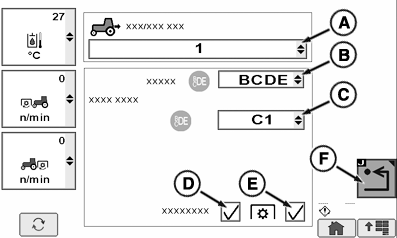
RXA0112383-UN-10DEC10
A - Forward/Reverse Speed Ratio
B - Range for CDE Button
C - Start Gear for CDE Button
D - Softshift Enable/Disable
E - PTO Adjust
F - Return
Press Transmission softkey, then the Advanced Settings softkey.
During a shuttle shift, a reverse gear can be selected to match the forward gear.
Reverse/Forward ratio can be set to operate independent of each other, the same or between 1 to 3 gears slower or 1 to 3 gears faster than selected forward gear. With reverse/forward speed ratio highlighted, rotate command dial to select desired setting.
In Manual Mode, the transmission uses this setting to choose a new gear in the same range in the opposite direction. In Auto Mode, the transmission uses this setting to adjust the set speed in the opposite direction.
NOTE: If a +3 is selected and the gear is currently C4 in forward, C4 will be the range/gear in reverse.
Independent allows the tractor to remember the last forward and reverse gear setting. Once the gear is manually changed in the reverse direction, the gear will automatically go back to the last gear when changing directions. If the gear is not manually changed when in reverse direction, then the forward gear and reverse gear will remain the same when changing directions. In Auto Mode, reverse and forward set speeds function independent of each other.
ZE59858,000040F-19-20110114 |